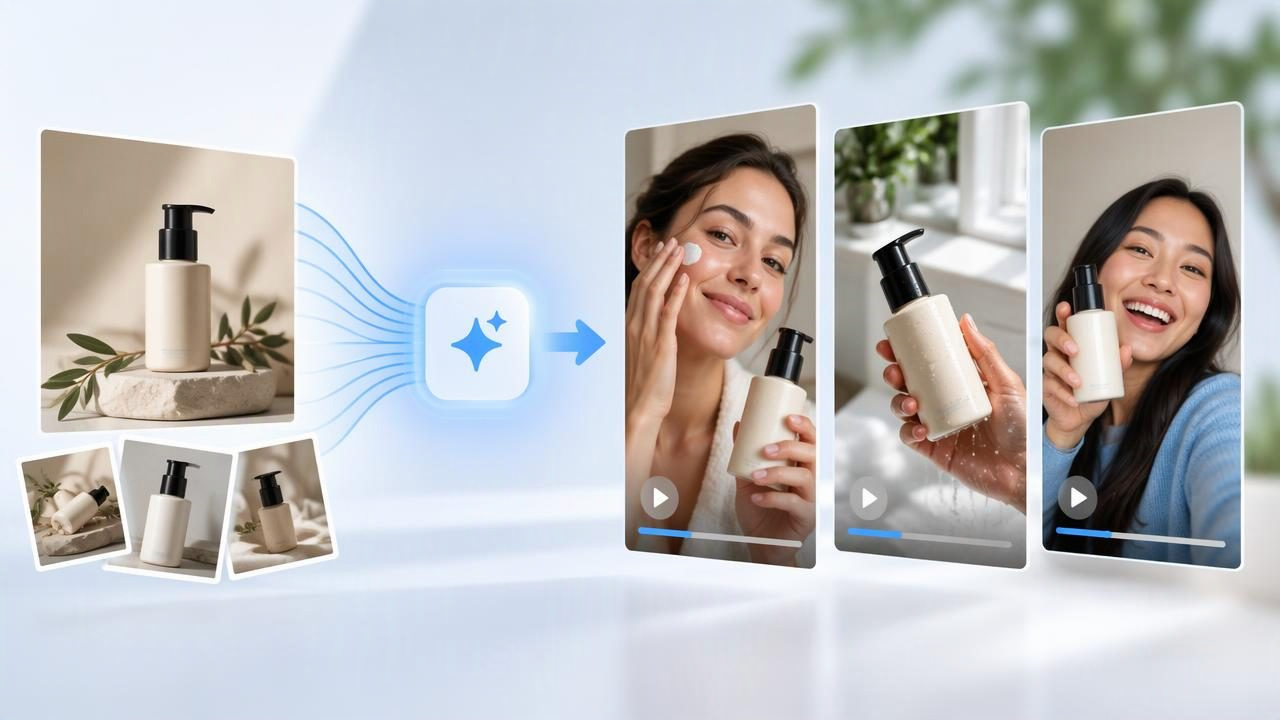
Direct-to-consumer brands need product videos that quickly explain what an item does and why it might matter to a buyer. But producing a new shoot for every creative idea can take time, coordination, and budget. An AI product demo maker for direct-to-consumer brands offers another way to explore video concepts: start with an existing product photo, create different UGC-style treatments, then assess which ideas deserve further development.
The important distinction is that AI-generated concepts are not proof of product performance. A video can help communicate a real feature, but it cannot verify that feature or replace a product test. Used thoughtfully, image-based video generation is a tool for visual storytelling and creative exploration—not a shortcut around accurate claims.
What an AI product demo maker can help with
A product demo video shows an item in context, highlights a relevant detail, or explains how it is intended to be used. An AI tool can help turn a still image into a short video concept with a chosen setting, pacing, or creator-style presentation. Depending on the tool and the source image, the result may add motion or create a scene around the product.
For a DTC team, this can make it easier to explore several creative directions before arranging a full production. For example, the same product image might inform a straightforward feature explanation, a problem-and-solution narrative, or a lifestyle-led introduction. These are concepts to review, not finished evidence of how the product works or how customers will respond.
- Explore creative angles: Compare different hooks, settings, and storytelling approaches without changing the underlying item.
- Make product details easier to discuss: Use a visual concept to decide which feature needs a closer shot or clearer explanation.
- Support early creative review: Share distinct directions with teammates before committing to additional production.
- Identify missing assets: Discover when a still photo cannot show the movement, scale, or use case a demo needs.
Start with a photo that supports the story
The source image affects what a generated video can communicate. A clear, well-lit product photo with the full item visible gives reviewers a stronger reference than a cropped, blurry, or cluttered image. If packaging text, controls, or small components matter to the concept, choose an image where those details can be inspected.
Before generating concepts, decide what the image is supposed to help explain. A front-facing pack shot may work as a reference for a product introduction, but it may not show how a device opens or how a garment fits. Avoid expecting one still image to establish details it does not contain. When a specific angle or interaction matters, gather the appropriate reference photos or plan to capture real footage.
It can also help to write down product facts separately from creative direction. Keep verified details—such as materials, dimensions, instructions, or supported uses—distinct from proposed narration, scene ideas, and visual flourishes. That separation makes it easier to spot a generated detail that looks plausible but is inaccurate.
A concrete example: comparing concepts for a reusable bottle
Imagine a DTC brand selling a reusable insulated bottle. The team has one clean product photo and wants to explore possible short-form demo directions. The photo shows the bottle’s shape, lid, and color, but it does not show how the lid opens, how the bottle fits in a bag, or how long it keeps a drink cold.
The team could use the image as a starting point for three hypothetical UGC-style concepts:
- Feature-led introduction: A presenter introduces the bottle and points viewers toward the lid and overall design. The team checks whether the product remains visually consistent and whether the proposed wording matches confirmed specifications.
- Everyday carry scenario: A creator-style setup places the bottle in a commute or desk context. Reviewers assess whether the setting supports the brand’s intended audience and whether any generated bag, hand, or scale cues misrepresent the real item.
- Care and use explanation: A simple narrative directs attention to a verified care instruction. If the image cannot show the relevant step, the team marks it as a production gap rather than treating an imagined action as a factual demonstration.
These examples describe possible creative directions, not actual product results or customer reactions. The team can compare the concepts for clarity, brand fit, visual plausibility, and factual accuracy. If a concept depends on showing the lid opening, the next step may be to film that interaction rather than rely on an AI-generated depiction based on a still image.
How to compare AI-generated video concepts
Comparisons are most useful when they isolate meaningful differences. If the hook, setting, script, pacing, and visual style all change at once, it may be hard to tell why one concept feels clearer than another. Keep the product and core verified information consistent, then vary one or two creative choices at a time.
| What to compare | Review question |
|---|---|
| Opening hook | Does the first line quickly establish a relevant need or introduce the item clearly? |
| Use context | Does the setting make sense for the product and the intended audience? |
| Product visibility | Can viewers recognize the item and see the detail the concept discusses? |
| Claim accuracy | Can every factual statement be checked against approved product information? |
| Visual consistency | Do the shape, color, label, and proportions remain credible throughout? |
| Next production step | Does this idea need real footage, another photo, or a clearer script? |
Write down the purpose of each variation before reviewing it. For example: “Test whether a direct feature introduction is clearer than an everyday-use opening.” This keeps the exercise focused on a creative question rather than treating a generated video as a performance result. A concept review can identify what to produce next; it cannot establish conversion lift or predict audience response with certainty.
Keep creative examples separate from product facts
UGC-style presentation often feels conversational, which can make a hypothetical scenario seem like a personal endorsement. Be clear about what is scripted or illustrative. Do not present an invented creator experience, testimonial, or product outcome as a real customer account. Likewise, avoid implying that a generated scene shows a verified use, result, or product attribute unless the brand has evidence to support that claim.
Review both the words and the visuals. A script may be accurate while the video suggests something untrue—for example, a product appearing larger than it is, a feature operating differently, or an accessory being included when it is not. Packaging and labels may also be altered or rendered unclearly. If a detail is uncertain, remove the implication, use a more suitable reference, or capture authentic footage.
Understand the limitations of image-based generation
A single photo contains limited information. It can show a product’s appearance from one viewpoint, but it does not necessarily reveal its dimensions, texture, movement, durability, or behavior in use. Generated motion can introduce distortions, and surrounding scenes may add visual details that were never present in the source. Small text, logos, reflective surfaces, and complex shapes deserve particular scrutiny.
AI-generated video also cannot confirm how real people will interpret a concept or whether it will perform well in an ad. That requires appropriate research or testing with actual audiences and a clear measurement plan. Treat generation as an efficient way to develop and inspect creative possibilities; treat claims and performance conclusions as separate questions that need suitable evidence.
For important demonstrations, use real product photography or footage that shows the relevant action. A product still can help establish the visual direction, while authentic close-ups can document a feature that the still does not prove. This combination supports more useful visual storytelling without asking generated imagery to carry factual weight it cannot support.
A practical review checklist
- Is the source photo sharp, well-lit, and representative of the product being sold?
- Does each concept have a distinct, written creative purpose?
- Are product facts and approved claims kept separate from imagined scenes?
- Do the product’s proportions, color, packaging, and details stay credible?
- Could any visual or line of dialogue be mistaken for a real testimonial?
- Have you identified which ideas need new photos, real footage, or fact-checking?
- Are you evaluating concepts as creative options rather than proven results?
Use generated concepts as a starting point
For direct-to-consumer teams, an AI product demo maker can help turn a product photo into a set of visual directions to discuss and refine. The best use is not to assume that every generated scene is ready to publish, but to compare hooks, clarify the intended story, and identify where authentic product evidence is needed. That approach makes content creation more deliberate while keeping brand engagement grounded in accurate information.
For a practical look at turning a product image into a video, see UGCMade’s guide to product photo-to-video workflows.
