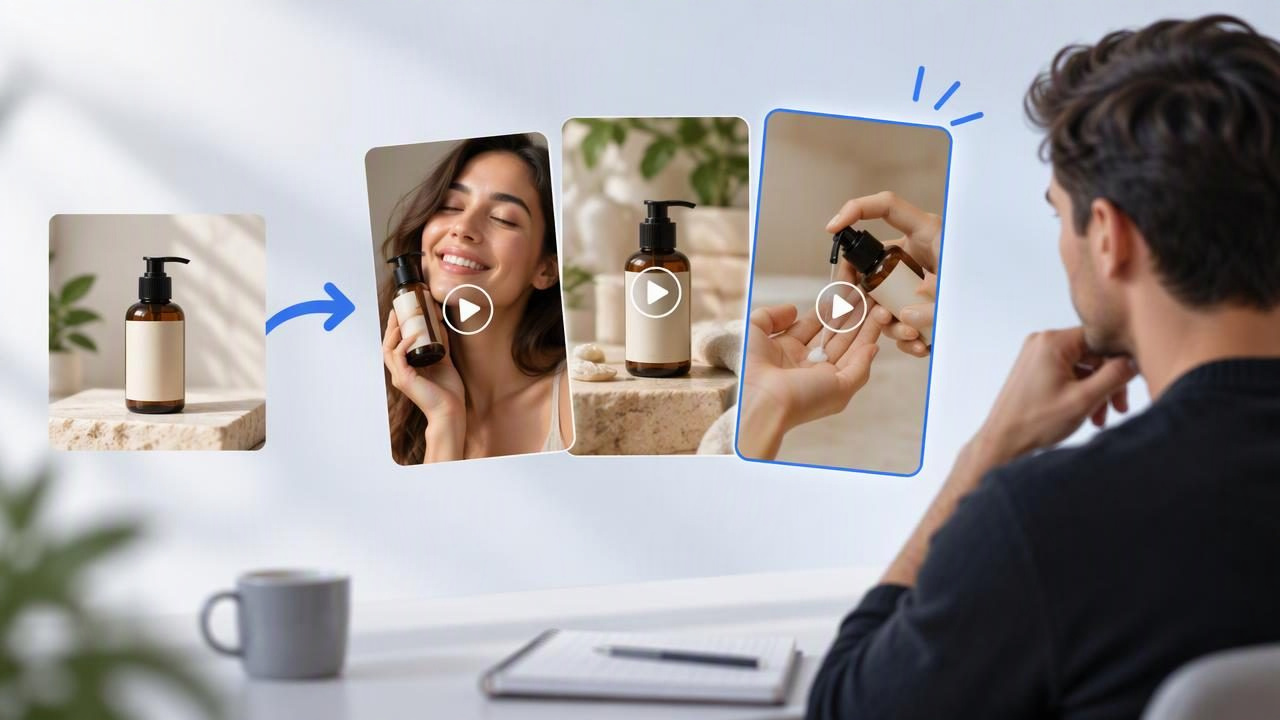
An AI UGC video generator guide for ecommerce brands should explain more than how to make a clip. The useful question is how to turn an existing product image into distinct creative concepts, compare them thoughtfully, and decide what deserves further review. AI-generated UGC-style videos can help teams explore visual directions, but a concept is not proof of product performance or a real customer recommendation.
This guide focuses on using one product photo as a creative starting point. You’ll learn how to prepare the image, create meaningfully different concept briefs, assess the resulting videos, and recognize where human review is essential.
What an AI UGC video generator can—and cannot—tell you
A product-photo-to-video workflow uses a still image as a visual reference for a moving scene. Depending on the tool and input, an AI system may produce a person-led presentation, a product-focused demonstration, or a short lifestyle-style sequence. These are creative interpretations, not automatically accurate demonstrations of how an item works.
Think of generated videos as drafts for creative exploration. They can help a team compare hooks, settings, pacing, and story angles before deciding which ideas merit production or audience testing. They cannot establish that a product claim is true, that a depicted person is a customer, or that a particular concept will increase sales. Those conclusions require evidence beyond the video itself.
Keep the distinction clear: a generated concept shows what a creative direction might look like. Actual product results come from reviewing factual accuracy and, where appropriate, testing approved creative with a defined audience and measurement plan.
Start with a product photo that supports the story
The source image shapes what the video can plausibly show. Choose a clear, well-lit photo in which the product is large enough to inspect. A simple background can make the item easier to distinguish, while a visible label, distinctive shape, or included accessory can help reviewers compare the generated result with the real product.
Before using an image, confirm that you have the rights to use it and that it does not contain details you do not want reproduced. Check that packaging, color, proportions, and product names are visible and current. If the item has multiple versions, select the exact variant the concept is meant to represent. A single image may not communicate details such as texture, scale, assembly, or how an item behaves in use.
Write down the product facts that must remain unchanged. For example: “500 ml capacity,” “stainless-steel body,” and “hand-wash only.” Add approved claims only if you can substantiate them. This short reference gives reviewers a standard for spotting invented features, altered packaging, or misleading visuals.
Example: compare concepts for a reusable water bottle
Imagine an ecommerce team has one clean product photo of a reusable bottle. The photo shows its shape, lid, and color, but not its scale beside a person or how it is used. Rather than requesting three versions of the same generic product pitch, the team can define three different creative hypotheses:
- Everyday carry: A creator-style presenter introduces the bottle while packing a work bag. The opening question focuses on what the presenter carries during a commute.
- Feature explanation: A close-up-led concept focuses on the lid and visible bottle details. The script explains only confirmed features, avoiding claims about leak resistance or insulation unless those claims are verified.
- Gift consideration: A lifestyle scene frames the bottle as a possible gift. The angle explores appearance and everyday usefulness without suggesting that recipients have already praised it.
These are illustrative creative examples, not real customer experiences, verified product demonstrations, or evidence of campaign results. If the generator depicts a person speaking, the team should not present that person as an actual buyer or imply a genuine testimonial. Any spoken script should be checked against product documentation and applicable advertising rules.
The concepts also have different visual requirements. The everyday-carry idea needs a plausible bag and setting. The feature explanation needs a legible, faithful view of the lid. The gift idea needs a context that does not obscure the product. A source image may support some directions better than others; if important details are absent, use additional approved reference images or revise the concept rather than expecting the model to infer them correctly.
Compare concepts on consistent criteria
Review each draft against the same criteria. This keeps a polished-looking video from winning simply because it has more visual movement, and helps separate creative appeal from product accuracy.
| Review criterion | What to check | Useful reviewer question |
|---|---|---|
| Product fidelity | Shape, color, label, components, and proportions | Would a shopper recognize the exact item? |
| Claim accuracy | Spoken and on-screen statements | Can the brand substantiate every product claim? |
| Concept distinction | Hook, setting, audience need, and story | Does this offer a genuinely different angle? |
| Clarity | Audio, captions, framing, and pace | Can viewers understand the central idea? |
| Brand fit | Tone, styling, and visual identity | Does it feel appropriate for this brand? |
Score each criterion using a simple internal scale, such as “needs revision,” “review-ready,” or “approved for the next step.” Add a short note explaining each rating. This is a practical prioritization method, not a validated performance score. Avoid combining all criteria into one number if doing so could hide a serious factual issue.
Keep concept comparison fair
When comparing outputs, change one major creative variable at a time where possible. For example, hold the product, offer, approximate duration, and audience constant while exploring different hooks. If every version changes the script, setting, length, and product angle, it becomes difficult to know what distinguishes the concepts.
Save the prompt or creative brief alongside each draft. Note which source image was used, what changed, and what reviewers approved or rejected. This creates a useful record for creative discussions and makes it easier to request focused revisions. If the purpose is to test audience response, define the test separately: choose the audience, placement, budget, duration, and success metric before interpreting results.
Do not treat a team’s preference as evidence that a concept will perform better. Internal review can identify clarity, brand fit, and accuracy concerns; audience testing can provide performance data under specific conditions. Neither guarantees the same outcome in a different context.
Limitations to check before publishing
- Product details can drift. Generated motion may change a label, shape, color, or component. Inspect the entire clip, not just the opening frame.
- Actions may be invented. A video can imply that a product opens, pours, fits, or functions in a particular way. Verify every action against the real item.
- Scripts can overstate benefits. Review narration, subtitles, graphics, and captions for unsupported claims, absolutes, or implied guarantees.
- UGC style is not the same as customer evidence. A creator-like appearance does not make a synthetic character a real user. Do not fabricate testimonials or endorsements.
- One photo limits the scene. Missing views, scale references, and usage details can lead to inaccurate interpretations. Supply suitable references or choose a concept that stays within what the image supports.
- Rights and disclosure still matter. Confirm permissions for source assets, voices, likenesses, and music, and review current platform and advertising requirements before publication.
These checks are particularly important for products where safety, performance, or precise use instructions matter. In such cases, a generated concept may be useful for exploring a hook or visual mood, while the actual demonstration may require verified footage, expert review, or additional product documentation.
A practical decision rule
After review, sort concepts into three groups: reject for factual or brand issues; revise because the idea is useful but execution is unclear; or consider for the next production or testing stage. Keep rejected concepts and reasons in your notes so the same problems do not reappear in later drafts.
For the bottle example, the feature-explanation idea should not advance if the generated lid differs from the real one. The everyday-carry concept may be worth revising if the bottle is difficult to see. A gift-focused idea can remain a candidate if it is clear, accurate, and aligned with the campaign brief—but that still does not show how shoppers will respond.
Turn a product image into a better creative decision
The value of an AI UGC video generator for an ecommerce team is not simply producing motion from a still photo. It is the ability to make creative directions visible enough to discuss, compare, and refine. Start with a reliable reference image, define distinct concepts, check each output against product facts, and separate internal creative judgment from measured campaign results.
For a more detailed workflow on using a product image as a video starting point, see UGCMade’s guide to turning product photos into video. Use that kind of reference to inform your process, then apply your own accuracy checks and testing plan.
