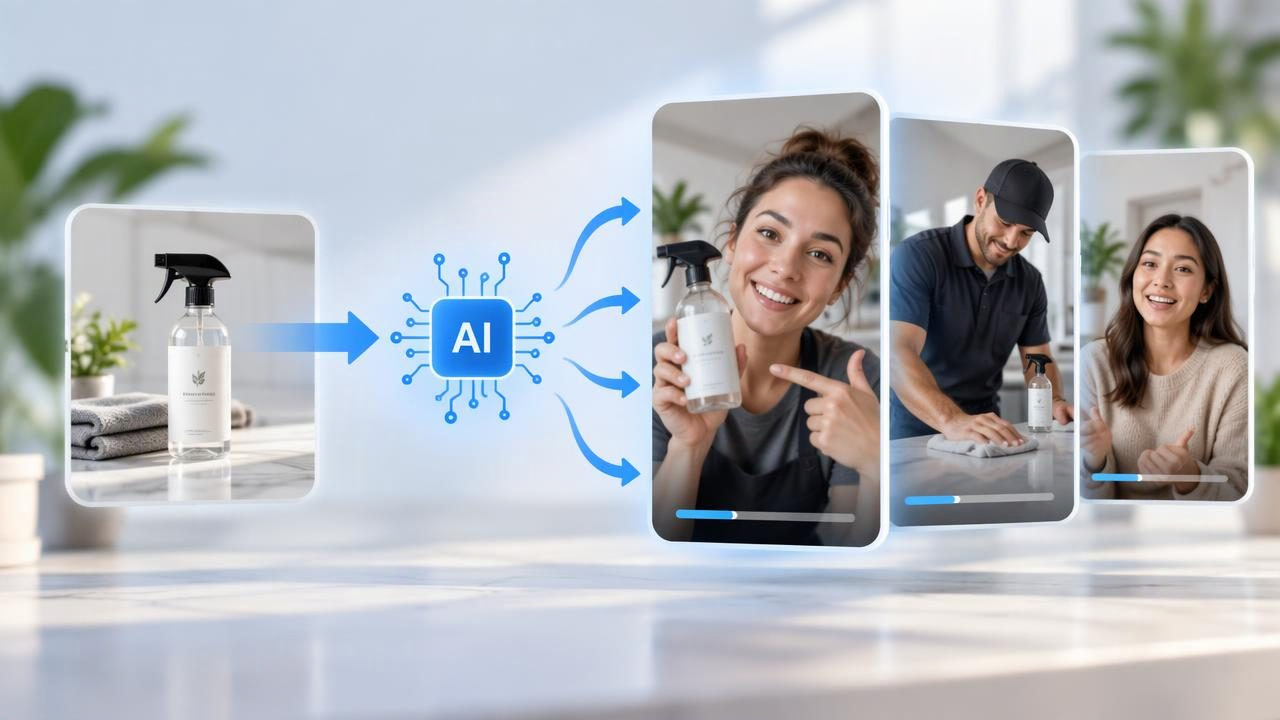
Service businesses sell an experience, expertise, or an outcome—not always a product that can be filmed on a tabletop. That can make short-form video feel harder to plan. An AI UGC video generator can help you explore creator-style concepts from an existing product photo, service tool, or other relevant image. The key is to use those clips as creative concepts, not as proof that a service delivered a particular result.
If you are searching for the best AI UGC video generator to produce service business videos, begin with the job the video needs to do. A useful tool should help you make and compare ideas while keeping the real service, its limits, and its visual details clear. The right choice depends on your source images, review process, and how accurately the generated video represents your business.
What makes an AI UGC video generator useful for a service business?
AI-generated UGC-style video uses a casual, creator-inspired visual approach: a direct-to-camera explanation, a personal-feeling recommendation, or a simple demonstration. The style can make an ad feel approachable, but “UGC-style” does not mean a real customer made or endorsed it. Be transparent about synthetic presenters and do not attribute invented experiences to customers.
For a service business, a source image can provide a visual anchor when the service itself is difficult to capture. That might be a technician’s tool, a salon product, a branded kit, a piece of equipment, or an item customers receive. The image can inspire multiple story directions without requiring you to claim that an AI-generated scene documents a real appointment.
A suitable generator should make it practical to explore different hooks and scenes while giving you a way to inspect the output. Pay attention to whether the important object stays recognizable, whether the motion looks plausible, and whether the concept can be edited or rejected before publication. A polished-looking clip is not automatically an accurate one.
Start with an image that supports the service story
Choose a clear, high-resolution image with the main object easy to identify. Avoid clutter, tiny details, and prominent text that may become distorted in motion. If the image shows a branded item, confirm that the logo and packaging are current. Use assets you own or have permission to use, and check that people shown in source material have agreed to its intended use.
Think about the relationship between the image and the service. A photo of a cleaning product could introduce a home-cleaning service, but it does not prove a specific home was cleaned. A photo of a bike component can support a repair-service concept, but it does not show that a mechanic completed a tune-up. Keep the image’s role modest: it is a starting point for a story, not evidence of an outcome.
Before generating concepts, write down the factual points the video may communicate: the service offered, the service area, a real process detail, and any conditions or exclusions. Mark claims that need verification. This gives reviewers a simple standard for catching invented credentials, prices, guarantees, or results in generated dialogue or on-screen text.
Concrete example: compare concepts for a mobile bike repair service
Imagine a mobile bike repair business has one clean product-style photo of a replacement bike chain. Its service is a scheduled tune-up at the customer’s home. The image can help the team explore how to introduce the service, but the chain itself should not be presented as proof of a completed repair. Start with one accurate message, such as: “Book a mobile bike tune-up and ask about chain wear during your appointment.” Confirm that the wording matches the actual service before using it.
From that image, create three creative examples for internal review:
- Convenience hook: A creator-style presenter explains that the customer can arrange a tune-up at home. The chain appears as a visual cue while the presenter describes the booking idea.
- Maintenance question: The opening asks, “Not sure when your chain needs attention?” The clip introduces an inspection as a topic to discuss with a mechanic, without diagnosing the viewer’s bike.
- Service-process concept: The video outlines a possible sequence—request an appointment, discuss the bike’s symptoms, and confirm the work with the mechanic. Each step must reflect the business’s actual process.
These are concept directions, not statements about verified customer experiences or completed repairs. If the generator animates the chain or places it in a workshop scene, that scene is illustrative unless it is replaced with footage of the real business. Do not add a customer quote, before-and-after repair, or testimonial unless it is genuine, authorized, and accurately represented.
To compare the concepts, keep the service description and image consistent while changing one creative variable at a time—such as the opening hook or the order of information. Review whether each version is easy to understand, faithful to the service, and visually credible. A concept preference from a team review is not evidence of better ad performance. Only a properly conducted campaign test can show how audiences respond, and results may vary.
How to evaluate a generator before using its videos
There is no single tool that is best for every service business. Compare options against the work you actually need to do, rather than relying on a broad “best” label. Useful evaluation questions include:
| What to assess | Questions to ask |
|---|---|
| Image fidelity | Does the main object remain recognizable, or do its shape, logo, and details change? |
| Creative control | Can you direct the hook, setting, tone, and intended message clearly enough to compare concepts? |
| Accuracy review | Can a staff member inspect the dialogue, visuals, and text before anything is published? |
| Disclosure and rights | Can your workflow meet applicable rules for synthetic media, permissions, and advertising claims? |
| Practical fit | Does the output suit the channels and aspect ratios you need, and can you edit it as required? |
Test a representative image before building a campaign around a tool. Review the complete result, including generated captions and spoken lines. If a feature or output format matters to your workflow, verify it directly rather than assuming every platform offers it.
Limitations to account for before publishing
AI-generated motion can alter product details, create awkward hands or object interactions, or place a service tool in a misleading context. Fine print, logos, and small labels may become unreadable. These issues matter particularly when viewers could interpret an image as showing the exact equipment, process, or result they will receive. Check every frame that communicates a factual detail; replace inaccurate imagery with real footage or use a simpler concept.
Generated presenters and dialogue also need careful review. Do not frame a synthetic character as a real customer, licensed professional, or employee unless that identity and representation are truthful and authorized. Avoid invented reviews, outcome claims, credentials, warranties, and guarantees. A disclaimer cannot make a false central message accurate.
Finally, an image-based concept cannot establish whether a service is effective, whether customers are satisfied, or whether an ad will perform well. It can help a team visualize different ways to explain an offer. Actual results require real service evidence and, for marketing performance, measurement of live campaigns against a suitable comparison.
A practical review process for service-video concepts
- Choose the image: Select one relevant, authorized visual that can support the service story.
- Set factual boundaries: Write the offer and approved claims, and list details the video must not invent.
- Vary one idea: Develop distinct hooks or story angles while keeping the core service facts consistent.
- Check the result: Review visuals, voiceover, captions, object details, and any implied customer experience.
- Label and test responsibly: Disclose synthetic content where required, then distinguish internal creative preference from measured campaign performance.
This approach makes comparison more informative than generating several nearly identical clips. It also helps a service team preserve brand voice and avoid confusing an illustrative scene with documentation of real work.
Can a product photo work if the business mainly sells a service?
Yes, if the photographed item is genuinely connected to the service and the video does not imply unsupported results. A tool, kit, ingredient, or replacement part can anchor an explanation, while real service footage can show the actual people and process when available. For a practical overview of using an image as a video starting point, see UGCMade’s product photo-to-video guide.
Make the concept engaging without overstating the service
The strongest AI UGC-style videos for service businesses combine a clear hook with honest context. Use a product image to explore alternative ways to introduce a service, compare those concepts against the same factual message, and replace illustrative scenes when viewers need to see real work. Treat the generator as a content-creation aid—not a source of testimonials, proof, or guaranteed marketing outcomes.
