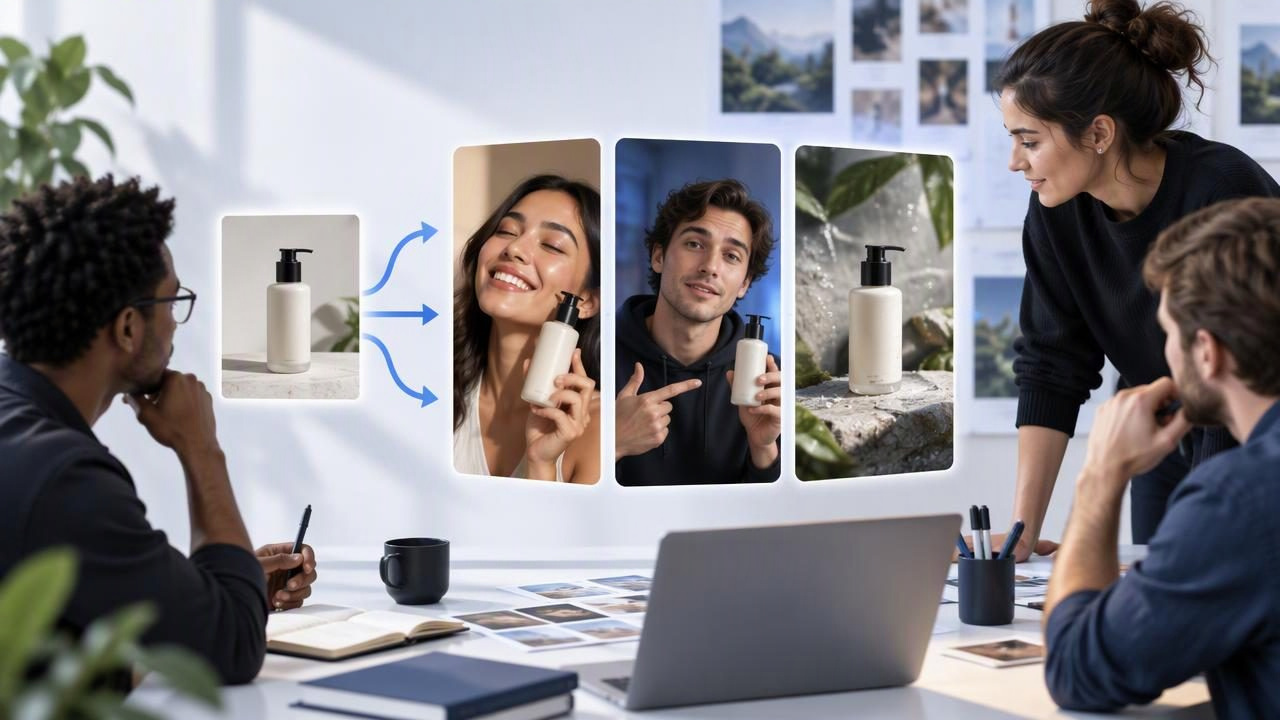
Creative agencies often need to present several strong directions before a product video is approved. A product photo can help you develop and compare AI-generated, creator-style ad concepts without treating early creative as proof of how the product performs. The key is to use the image as a reference, brief the concepts deliberately, and assess each result for both creative quality and factual accuracy.
This guide explains how to build that process, using a fictional skincare product as a practical example. The concepts are illustrative—not real campaign results, customer experiences, or claims about a particular product. That distinction helps agencies explore visual storytelling while protecting client trust.
What a creator-style ad maker helps an agency explore
A creator-style ad maker is a tool or workflow for developing short-form video concepts that borrow familiar social-video conventions: direct-to-camera delivery, a personal point of view, a quick demonstration, or a casual product introduction. The style can feel conversational, but it should not imply that an actual creator used or endorsed the product if that did not happen.
For agencies, the most useful role is often concept exploration. Starting from a product image, a team can investigate different hooks, settings, pacing, or story structures. This can make a creative review more concrete than a list of abstract ideas. It does not establish that a generated person is a real customer, that the product works as described, or that any concept will outperform another.
Prepare the product photo and the creative brief
Choose an image that shows the product clearly. A front-facing pack shot with readable packaging and minimal obstruction is a practical starting point. If the image is cropped tightly, poorly lit, or hides important details, generated scenes may be harder to assess. A single photo also cannot communicate details that are not visible, such as how a cap opens or how a texture feels.
Before creating concepts, write down the information the image cannot provide. Include approved product facts, the intended audience, the campaign objective, required disclaimers, and any visual or language restrictions. Separate confirmed facts from creative hypotheses. For example, “the bottle contains 50 ml” may be a verified package detail, while “a morning routine is a useful context” is a creative choice.
- Confirm the source: Use an image the client has permission to use, and check that the product shown matches the item being promoted.
- List approved claims: Keep a concise reference for ingredients, use instructions, benefits, and prohibited wording.
- Set a consistent brief: Define audience, approximate duration, placement, tone, and call to action before comparing concepts.
- Mark unknowns: Do not ask a generated scene to demonstrate a feature or result that the reference material does not substantiate.
A clear brief makes the comparison fairer: if every version has a different audience, message, and call to action, it is difficult to know what the creative team is actually evaluating.
Concrete example: three concepts from one skincare image
Imagine a fictional moisturizer shown in a clean product photograph. The agency has verified only its name, size, and the label’s basic directions. It has no customer interviews, clinical evidence, or approved claim that the moisturizer changes skin. The team can still develop distinct creative routes, as long as the concepts do not invent product results.
| Concept | Creative premise | What to review |
|---|---|---|
| Routine moment | A creator-style presenter introduces the bottle as one item in a hypothetical morning routine. | Does the opening make the product easy to identify? Does the scene avoid claiming a personal result? |
| Packaging close-up | The video focuses on the label and visible packaging, paired with a neutral voiceover about verified details. | Are the words on the package represented accurately? Is any generated label text misleading? |
| Question-led introduction | A presenter asks what to check when choosing a moisturizer, then introduces the product without promising an outcome. | Does the question feel relevant? Does the answer stay within the approved brief? |
These are creative examples, not actual product results or recommendations. They show how one reference image can inspire different story structures while keeping product claims constant. If the product is real, replace every fictional detail with client-approved information and have the appropriate reviewer check the finished asset.
Compare concepts with a consistent scorecard
Creative review can become subjective when one stakeholder prioritizes polish and another prioritizes a memorable hook. A simple scorecard gives the team common criteria. Score each item against the brief, and add a note explaining the rating. The purpose is to choose what merits refinement—not to predict conversion performance from a mock-up.
- Product accuracy: Is the item recognizable, and are packaging details, wording, and use represented faithfully?
- Claim safety: Does the concept avoid unsupported benefits, fabricated testimonials, or implied personal experience?
- Hook clarity: Can a viewer understand the opening idea quickly without misleading them?
- Visual coherence: Do the setting, presenter, product, and pacing support the same creative premise?
- Brand fit: Does the tone align with the client’s identity and audience, rather than relying on a generic social-media style?
- Production potential: Is the concept clear enough to refine, verify, and adapt for the intended placement?
Record factual issues separately from creative preferences. A misspelled label is an accuracy problem; a setting that feels too formal may be a preference or brand-fit issue. This distinction helps agencies give specific feedback and avoid polishing a concept that needs a factual correction first.
Keep generated concepts separate from product evidence
A convincing-looking video is not evidence that a product works, that a person has used it, or that a customer said the displayed words. AI-generated presenters and scenarios are creative material. Do not label them as testimonials or depict them in a way that reasonably implies a genuine customer endorsement unless the content is based on a real, properly authorized person and experience.
Review product details frame by frame where needed. Generated visuals can alter packaging, create unreadable or invented text, show an implausible interaction, or introduce an accessory that was not in the reference. Review audio and captions too: a voiceover may include a claim that was not in the brief even if the visuals appear accurate. If a detail cannot be verified, remove it, correct it, or choose a simpler concept.
Also check usage rights, client approvals, disclosure requirements, and the rules of the intended advertising placement. Requirements can vary by market and channel, so a creative team should not assume that a concept suitable for an internal review is automatically ready to publish.
Understand the limits of a one-photo workflow
One product image is a useful starting point, but it is a narrow source of truth. It may not show the back label, scale, packaging materials, product texture, or correct way to use the item. A generated video may fill visual gaps with plausible-looking details that are nevertheless wrong. The more the concept depends on showing an unseen feature, the more reference material and human review it needs.
There are creative limits, too. A set of variations can look different while communicating essentially the same idea. Conversely, changing the presenter, setting, script, and pacing all at once makes it difficult to identify which change mattered in a later test. Treat generated options as drafts for discussion, not finished ads or reliable forecasts.
When the team needs a precise demonstration, provide additional approved images, video references, or a human-shot product sequence. If no suitable source exists, revise the concept so it does not require an unverified action or result. This is often more efficient than trying to correct an elaborate scene that was built on missing information.
Turn the review into a useful testing plan
After selecting concepts that pass accuracy and brand review, decide what question each one is meant to explore. For instance, compare a routine-led opening with a question-led opening while holding the product facts and call to action steady. Keep a record of the script, visuals, audience, placement, and changes made so the team can interpret any later results.
Only a properly run live test can provide evidence about audience response in its specific conditions. A concept scorecard measures internal creative fit; it does not measure clicks, sales, or conversion lift. If testing is appropriate, use the client’s approved measurement process and compare versions under reasonably consistent conditions. Read outcomes as context-specific, not as a guarantee that the same creative will work elsewhere.
For a compact workflow, agencies can first define claims and constraints, then prepare one clear image and a shared brief, develop distinct concepts, review them against the same scorecard, and revise only the ideas that are accurate and on-brand. For additional guidance on turning a product image into a video concept, see UGCMade’s product-photo-to-video guide.
Make the creative comparison useful
A creator-style ad maker can help agencies move from a static product photo to a more tangible set of creative directions. Its value lies in making alternatives easier to discuss—not in replacing product knowledge, customer evidence, or professional review. Start with a truthful brief, compare concepts against the same criteria, and distinguish clearly between an illustrative scene and a verified product result.
When those boundaries are clear, product photography becomes a practical input for visual storytelling: one image can prompt several routes, while disciplined review keeps the final direction grounded in what the brand can actually support.
