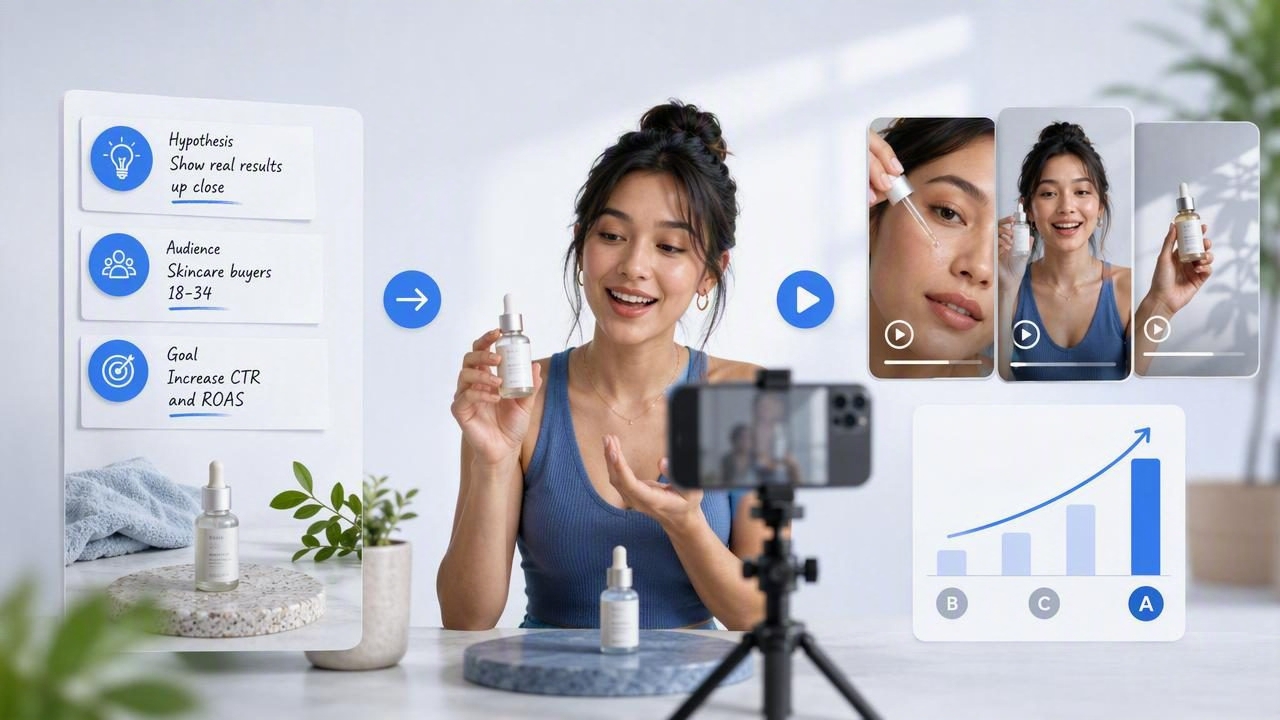
Rapid creative testing is not simply about making more ads. It is about producing meaningfully different creator-style video concepts from a clear starting point, then comparing them with a defined testing plan. For product marketers, ecommerce teams, and agencies, a creator style ad maker can help turn a single product image into several UGC-style creative directions without requiring a full production cycle for every idea.
The important distinction is this: generating several videos does not automatically create a useful test. Each variation needs a reason to exist. One might test a new hook, another a different problem statement, and another a different product benefit. If every version uses nearly identical language, scenes, pacing, and calls to action, the results will be difficult to interpret.
This guide explains how to prepare product photos, build creator-style concepts, compare variations, and understand the limitations of AI-generated UGC-style video before using it in a paid or organic campaign.
What Rapid Creative Testing Actually Means
Rapid creative testing is a structured approach to comparing advertising ideas in a shorter time frame. Instead of debating one “perfect” ad concept for weeks, a team prepares a small set of distinct creative hypotheses and evaluates them using campaign data.
For creator-style video ads, the variables worth testing often include:
- The opening hook: a question, a surprising statement, a product reveal, or a pain point.
- The audience angle: who the message is designed to resonate with.
- The product benefit: convenience, appearance, comfort, speed, value, or a specific use case.
- The narrative format: testimonial-style, problem-solution, routine, unboxing, demonstration, or comparison.
- The visual emphasis: close-up product detail, in-use context, packaging, texture, or outcome framing.
- The call to action: learn more, explore the product, view options, or shop the collection.
A creator style ad maker can support concept exploration, but it cannot tell you which message will perform best for your audience before you run a test. That answer comes from real delivery conditions, audience behavior, offer strength, landing-page alignment, budget, and the platform’s ad system.
Start With a Product Image That Can Support Multiple Angles
A product photo is more than an asset to animate. It is the visual reference that shapes what a video concept can credibly show. If the image is unclear, heavily edited, low resolution, or missing important product details, the resulting concept may have less visual consistency.
Choose a product image that makes the item easy to understand at a glance. Ideally, it should show the packaging, shape, color, label, and key design features without distracting clutter. A simple front-facing product photo can be useful for packaging-led concepts, while a lifestyle image may better support a use-case or routine-led direction.
Product photo preparation checklist
- Use a sharp, well-lit image with the product clearly visible.
- Check that important label text, colors, and packaging details are accurate.
- Remove visual distractions that compete with the product.
- Keep approved product photos and brand reference materials in one place.
- Identify which details must not change, such as logo placement, product size, or colorway.
- Confirm that every claim planned for the script is approved and supportable.
This preparation matters because creator-style ads depend on perceived clarity and relevance. Viewers should quickly understand what the product is and why it may matter to them. Strong product photography gives your visual storytelling a more reliable foundation.
Build Testable Concepts, Not Random Video Variations
The fastest way to waste a creative test is to produce numerous minor edits with no clear hypothesis. A useful testing set contains variations that isolate a meaningful difference. You do not need ten radically different ads at once; three focused concepts can provide more actionable learning than a large batch of nearly identical versions.
Use a simple concept brief for each variation:
Audience: Busy professionals who want a simpler morning routine
Primary tension: Too many steps and too little time
Product role: Helps simplify one part of the routine
Hook type: Relatable problem statement
Visual focus: Product close-up followed by in-use context
CTA: Explore the product details
The brief does not need to be complicated. Its purpose is to make every concept comparable. When results arrive, you can connect performance differences to a specific creative decision instead of guessing why one video received more attention than another.
A Concrete Example: Three Concepts From One Product Image
Imagine a fictional skincare brand with a clean product image of a facial cleanser on a bathroom counter. The brand wants to explore creator-style short videos aimed at people who want a more straightforward evening routine. The following examples are creative concepts only. They are not verified product results, customer feedback, or claims that any version will improve conversions.
| Concept | Creative Hypothesis | Sample Opening | What Changes |
|---|---|---|---|
| Routine shortcut | A time-saving angle may resonate with busy viewers. | “My evening routine got much simpler when I stopped overcomplicating it.” | Problem is time and complexity. |
| Texture and ritual | A sensory, calm visual angle may hold attention for self-care audiences. | “This is the small reset I look forward to at the end of the day.” | Emphasis is mood, product detail, and routine. |
| Product discovery | A direct discovery format may work for viewers unfamiliar with the category. | “If you are looking for a simpler cleanser, here is what I noticed first.” | Emphasis is product introduction and clarity. |
These concepts can use the same product image while testing distinct messaging. The first tests a practical pain point. The second tests an emotional and sensory framing. The third tests a straightforward product-explainer approach. That is a stronger test design than changing only background music, caption color, or a single line of copy.
Compare Concepts Before You Spend Media Budget
Before publishing or promoting a creator-style video, review each concept side by side. A comparison process helps prevent weak, confusing, or off-brand ideas from entering the test simply because they were quick to create.
Review each video for creative clarity
- Identify the first-second message. Can someone quickly tell what the video is about?
- Check product visibility. Is the product shown clearly enough to support recognition?
- Match the visual to the script. Does the video show what the narration or captions describe?
- Verify brand accuracy. Review logos, packaging, colors, terms, and approved claims.
- Assess concept separation. Is each variation genuinely testing a different angle?
- Check the destination. Does the landing page support the promise made in the ad?
A practical review can be done in a simple comparison sheet. Give every variation a name such as “Hook: Routine Shortcut” rather than “Version 4.” Clear naming protects the learning value of the test when multiple stakeholders review campaign results later.
Use Metrics That Match the Testing Question
Metrics should follow the hypothesis. If you are testing whether an opening line earns attention, early-view or hold-rate metrics may be more relevant than final purchase data alone. If you are testing a product explanation against a routine story, click-through behavior and landing-page engagement may provide useful context.
For a broader performance review, teams often consider:
- Initial attention and video-view behavior
- Click-through rate
- Cost efficiency relative to the campaign objective
- Landing-page engagement
- Add-to-cart activity or qualified leads, where relevant
- Purchases or other final conversion events
Do not declare a winner too early based on a small amount of delivery. Conversely, do not keep every variation running indefinitely. Set a decision rule before launch: for example, identify which hook earns the strongest qualified traffic after sufficient delivery, then use that learning to create the next round of variations.
Common Limitations of AI-Generated Creator-Style Videos
AI-generated UGC-style video concepts can make early creative exploration more accessible, but they have limitations. Treat the output as creative material that requires review, not as proof of real-world product experience or advertising performance.
- Generated scenes may not perfectly represent the actual product. Review packaging, proportions, textures, and product use carefully.
- Creator-style does not equal genuine customer testimony. Avoid presenting generated narration as a real customer review unless it is based on approved, authentic source material.
- Claims still need substantiation. Do not add results, guarantees, health-related statements, or comparisons that the brand cannot support.
- Performance cannot be predicted from appearance alone. A polished video may still lose to a simpler concept with a stronger message.
- Platform context matters. Aspect ratio, caption treatment, sound, audience targeting, and placement can all influence how a creative performs.
The goal is not to replace strategic judgment. It is to make the path from product photography to testable video ideas more efficient while keeping brand, legal, and performance review in the process.
Turn Each Test Into the Next Creative Brief
The most valuable outcome of rapid creative testing is not a single winning ad. It is a clearer understanding of which messages, visual cues, and audience tensions deserve further exploration. If the routine-shortcut concept earns stronger attention, the next round might test different versions of the same core idea: morning versus evening, speed versus simplicity, or a direct question versus a personal observation.
Document what changed, what remained constant, and what you learned. Over time, this creates a practical library of brand-specific creative patterns rather than a folder of disconnected videos.
For teams using product images as the starting point, UGCMade’s guide to testing ad variations offers additional context for organizing concepts into clearer creative comparisons. The best workflow remains simple: begin with a strong product image, create intentionally different creator-style concepts, review accuracy, and let real campaign data guide the next decision.
