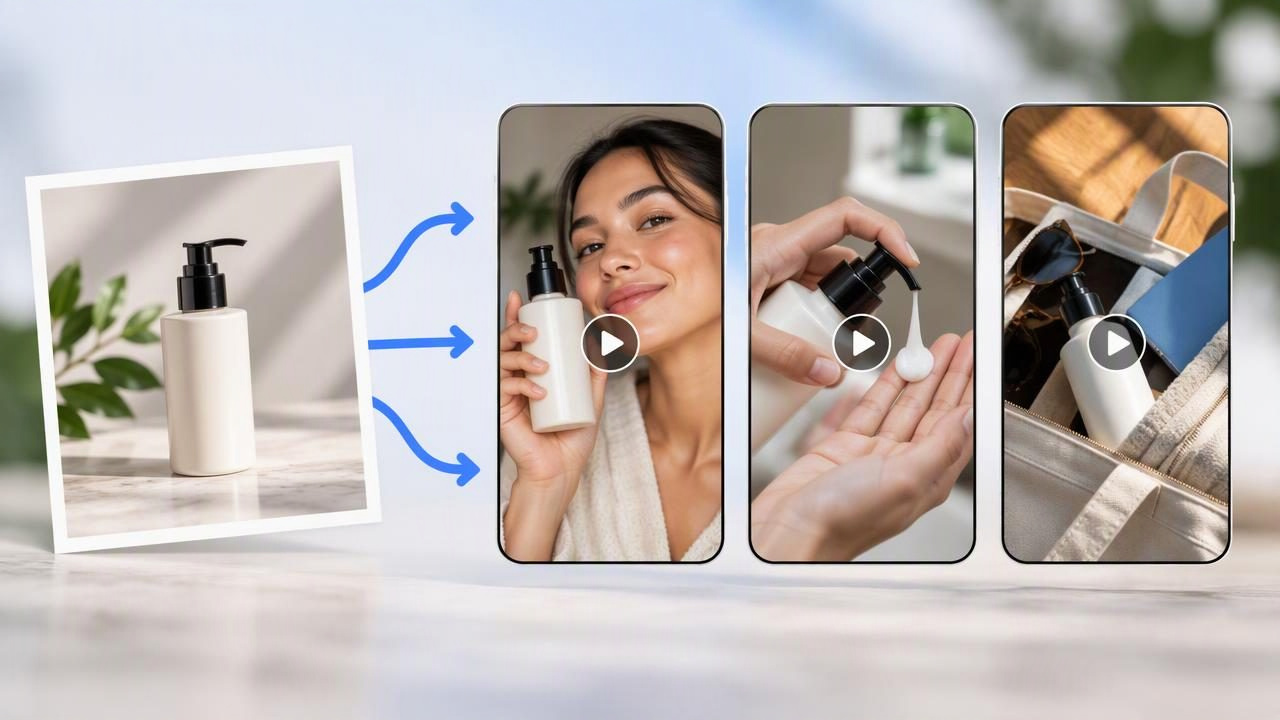
A single product photo can be a useful starting point for several short-form video ideas. The key is not to make three near-identical clips with different captions. Instead, use the image as a shared visual reference and build three distinct creative concepts around it: a problem-and-solution story, a feature spotlight, and a lifestyle moment.
This approach can help a marketing team explore different ways to tell a product story before investing in a larger production. It also has limits: one photo cannot prove how a product works, how it feels to use, or what results a customer will get. Treat AI-generated UGC-style videos as creative concepts to review, not evidence of real use or product performance.
Start with one clear source image
Choose a product photo that shows the item clearly, with enough detail to recognize its shape, color, materials, and packaging. A clean background can make the product easier to interpret, while a lifestyle photo may already suggest a setting or use case. Whichever you choose, check that the image is sharp, well lit, and free from distracting objects.
Before making video concepts, write down what the image actually confirms. For example, it may show a bottle’s color, cap, label, and overall design. It does not confirm whether the bottle keeps drinks cold, fits in a particular bag, or prevents leaks. This simple distinction helps keep scripts and visuals grounded in what you can substantiate.
- Visible details: product appearance, included items, packaging, and clearly shown parts.
- Verified details: specifications or benefits supported by reliable product information.
- Unknown details: performance, customer experience, or claims not established by the photo or other evidence.
Build three concepts, not three versions of the same ad
For a concrete example, imagine the source image is a reusable water bottle photographed upright on a plain background. The goal is to explore three different creative directions for a short social video. Keep the product image and any confirmed product facts consistent, but give each concept a different opening, story, and message.
Concept 1: A relatable everyday problem
Creative angle: Frame the bottle as part of a response to a familiar routine, such as getting ready to leave home and remembering to bring a drink. The opening could show a person reaching for the bottle beside their bag, followed by a close-up of the product.
Sample hook: “One less thing to remember on the way out.”
This is a storytelling direction, not proof that the bottle solves a specific problem or has a particular performance feature. If the photo does not show someone using the bottle, any person or action in the generated video is a creative interpretation. Do not present it as a real customer or an actual testimonial.
Concept 2: A product-detail spotlight
Creative angle: Make the bottle itself the focus. Use a simple sequence that draws attention to visible details in the image, such as its color, shape, cap, or printed design. A brief voiceover could describe only confirmed specifications, while on-screen text labels visible parts.
Sample hook: “A closer look at the details of this bottle.”
This concept is useful when the product has features shoppers should notice, but the creative must not imply details the image cannot verify. For example, do not depict a leak test, temperature test, or special opening mechanism unless the product facts and footage support it.
Concept 3: A lifestyle setting
Creative angle: Place the bottle within a plausible everyday context, such as on a desk or beside a gym bag. The scene can give viewers a sense of where the item might fit into a routine, while the product remains recognizable and visually consistent with the source image.
Sample hook: “A simple companion for your daily routine.”
A lifestyle scene is illustrative. It does not establish that a particular person owns or recommends the product, nor that the item is suitable for every activity shown. Avoid invented endorsements, customer quotes, and visual demonstrations of unverified performance.
Turn the concepts into comparable video briefs
Before using an AI video tool, write a compact brief for each direction. Give all three briefs the same basic boundaries: the source image, intended audience, approximate video length, required product facts, and any prohibited claims. Then vary the creative angle, rather than changing every input at once. That makes it easier to judge whether the story itself is appealing.
| Brief element | Everyday problem | Detail spotlight | Lifestyle setting |
|---|---|---|---|
| Opening | Remembering a drink before leaving | Close look at visible product details | Bottle placed in a daily setting |
| Main focus | Routine and relatable moment | Appearance and confirmed specifications | Context and intended use case |
| Evidence needed | Keep claims about benefits modest | Verify each stated feature | Do not imply a real endorsement |
| What to compare | Does the hook feel relevant? | Are details clear and accurate? | Does the setting fit the brand? |
If your chosen tool accepts written instructions, describe the desired pacing, scene, and tone in plain language. Be explicit about what must stay unchanged: product shape, label, color, and any visible branding. Ask for no extra product parts, unsupported demonstrations, or invented text. Different tools interpret instructions differently, so review the output rather than assuming it followed every direction.
Compare the videos fairly
Review the three concepts side by side using the same criteria. First, check product accuracy: does the item still resemble the photo, and have labels or details changed? Next, assess message clarity: can a viewer understand the idea quickly without relying on a claim you cannot support? Then consider visual quality, pacing, readability, and whether the tone fits the brand.
- Accuracy: Compare the product’s appearance with the source image and check all factual statements.
- Clarity: Identify the main idea after one viewing. Remove extra messages that compete with it.
- Distinctiveness: Confirm that each concept offers a genuinely different reason to watch.
- Brand fit: Review language, setting, wardrobe, and overall tone against your brand guidelines.
- Practical usability: Check dimensions, captions, audio, and legibility for the placement you have in mind.
When possible, change one creative variable at a time. For instance, keep the product facts and format constant while comparing the three hooks. If one version also has a different offer, length, setting, and soundtrack, it becomes difficult to tell which difference shaped the response. A structured comparison is a way to organize creative review; it does not guarantee better ad performance.
Keep creative examples separate from product results
Generated scenes can look polished and lifelike, but realism is not the same as evidence. A simulated person holding a bottle is not automatically a real customer. A generated splash, close-up, or use sequence does not verify durability, leak resistance, capacity, or any other functional claim. Label and use the material responsibly, following applicable advertising rules and the policies of the channels where you publish.
Before a concept becomes public-facing content, verify product statements against approved specifications. Replace invented dialogue that sounds like a customer review. If a video depicts a feature that matters to a purchase decision, use authentic footage or other suitable evidence to establish it. When the generated visual changes a logo, label, or product shape, correct it or choose another approach.
Know when one photo is not enough
A single image is a limited reference. It may not show the back of the package, scale, texture, moving parts, or how the product behaves in use. AI animation can also add visual details that were never present in the original. If accuracy depends on those details, gather additional approved photos, product footage, or verified specifications before developing the concept.
Also consider whether a UGC-style treatment is appropriate. A casual, creator-like tone can make a concept feel conversational, but it should not mislead viewers about who created or experienced the content. Keep the distinction between a designed creative and a real person’s personal recommendation clear.
A practical way to use the three-concept method
Use the first image to explore storytelling, not to make unsupported claims. Draft three briefs with distinct angles, hold the core product facts steady, and review each result against the same accuracy and brand-fit checklist. Keep promising ideas as drafts until visuals and claims have been checked. This creates a more disciplined path from product photography to video marketing while preserving room for creative exploration.
For a deeper look at the workflow, see UGCMade’s guide to testing ad variations. The central principle remains simple: one product image can inspire three different video concepts, but careful review is what determines whether any concept is accurate and ready to use.
