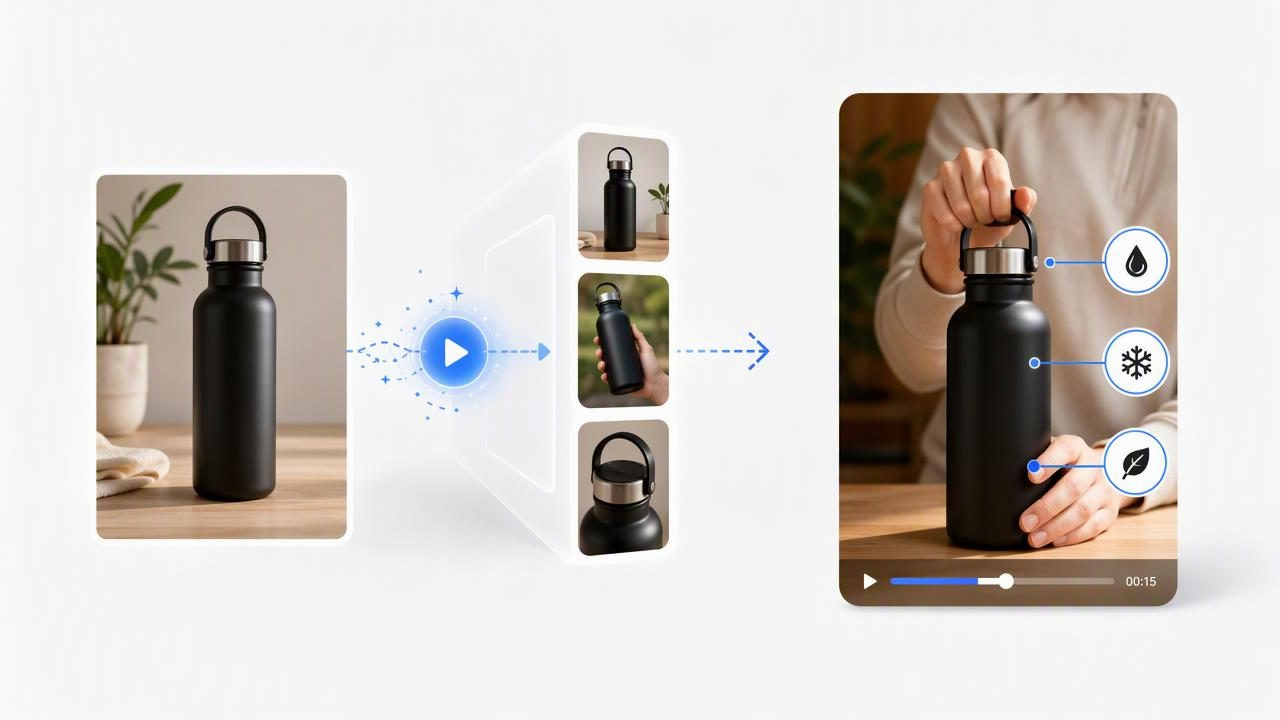
Learning how to turn product photos into demos starts with a useful mindset shift: a product image is not a finished video asset. It is evidence of what the product looks like, while a demo must explain what the product does, who it helps, and why someone should care.
A single product photo can be a practical starting point for planning several AI-generated, UGC-style video concepts. The important word is planning. A still image can help a team explore potential hooks, creator perspectives, use cases, and shot sequences before committing to a production direction. It cannot, by itself, verify a product claim, prove a feature works, or replace footage needed for a precise functional demonstration.
This guide explains how to prepare product photography for demo concepts, compare creative directions fairly, and recognize the limits of image-led video content. The goal is not to make every video look the same. It is to develop clearer visual storytelling that gives viewers a fast, credible reason to understand the product.
Start With the Job of the Product Demo
A product demo should answer one primary viewer question. That question varies by category:
- Beauty product: What does the texture, application, or routine look like?
- Kitchen tool: How does it make a daily task easier?
- Apparel accessory: How does it fit into an outfit or solve a carrying problem?
- Home product: Where does it go, and what irritation does it reduce?
- Wellness item: How might it fit into a routine, without making unsupported health claims?
Trying to answer every question in one short video often creates a confusing product pitch. Instead, choose one demo job per concept. For example, one concept may focus on setup, another on an everyday use moment, and another on the product’s most visible design detail.
This approach also makes content creation easier to evaluate. Rather than asking whether a video is “good,” ask whether the first few seconds make the intended value clear.
Prepare the Product Photo Before Building Concepts
The best source image is not necessarily the most artistic one. For product demo planning, select a photo that makes the item easy to identify and inspect. A clean image reduces ambiguity when a team is deciding how a product could appear in a creator-style setting.
Use a photo with these qualities
- A sharp, unobstructed view of the product’s main form
- Accurate packaging, label text, color, and proportions
- Lighting that does not hide important surfaces or controls
- A background that contrasts with the product
- Enough surrounding space to imagine a hand, counter, desk, bag, or shelf context
Before using the image, create a short product fact sheet. List only details that can be supported by the packaging, product page, instructions, or internal documentation. This matters because a polished demo can accidentally suggest capabilities that have not been verified.
Creative direction is not product proof. A proposed scene can communicate an idea, but it should not invent a result, mechanism, ingredient, compatibility claim, or before-and-after outcome.
For example, if a photo shows a reusable water bottle, it is reasonable to plan a “grab it before leaving home” scene. It is not reasonable to imply that it keeps drinks cold for a specific number of hours unless that claim is documented and approved.
A Concrete Example: One Photo, Three Demo Directions
Imagine a brand has one clean product photo of a compact cable organizer. The image shows a small zippered case, its exterior material, and several visible elastic loops inside. The brand wants to explore UGC-style video concepts for people who travel or work from cafés.
Instead of asking for a vague “product demo,” the team can use the photo to compare three specific creative ideas:
- The frustration-to-order demo: A creator opens a backpack and finds tangled charging cables. The product is introduced as the visible organizing solution, followed by a close-up of cables placed into the loops.
- The desk reset demo: A creator clears a cluttered desk before beginning work. The organizer holds a charging cable, adapter, and earbuds, with a simple line such as, “This is the one thing that keeps my work bag from becoming a mess.”
- The travel packing demo: A creator places the organizer beside passport, headphones, and a power bank before a trip. The focus is portability and finding small essentials quickly.
These are creative examples, not documented product results. The photo supports the product’s appearance and visible compartments. It does not establish that every cable type fits, that the case is waterproof, or that it solves clutter for every user. Any line about capacity, material performance, dimensions, or compatibility should be checked against approved product information.
The concepts differ because they frame the product’s value differently: relief from a problem, a daily habit, or a travel scenario. That distinction is more useful than changing only the soundtrack, voice, or camera angle.
Compare Concepts With a Simple Demo Matrix
A concept comparison matrix helps keep product video decisions grounded in viewer intent. Score each idea according to the message it needs to communicate, not simply how entertaining it seems on paper.
| Concept | Viewer problem | Best visible proof | Risk to check |
|---|---|---|---|
| Frustration-to-order | Tangled cables | Clear before-and-after organization | Do not overstate storage capacity |
| Desk reset | Daily clutter | Fast placement of essentials | Keep the setup realistic and readable |
| Travel packing | Finding accessories on the go | Product beside common travel items | Do not imply airline, device, or weather compatibility |
For each direction, write the opening visual, product reveal, visible action, and closing message. This gives creative teams a consistent way to compare concepts even when the eventual visual execution differs.
Opening: “Why are my charging cables always tangled?”
Reveal: Show the organizer opened on a desk.
Action: Place cable, adapter, and earbuds in visible loops.
Close: “A simpler way to keep small tech essentials together.”
The sample script is intentionally modest. It describes an observable use case rather than promising a universal outcome. That makes it easier to align product marketing with what the image and approved facts can support.
Make the UGC-Style Format Feel Useful, Not Forced
UGC-style video concepts often work best when the creator perspective has a believable reason to exist. A first-person voice can make a product demo easier to follow when it explains a real decision, routine, or annoyance. It becomes less effective when it relies on generic excitement without showing the product in context.
Use these prompts to create stronger creator-style directions:
- What was the person doing immediately before reaching for the product?
- Which product detail needs a close-up to make the story understandable?
- What can viewers visibly see happen in the scene?
- What statement would need legal, product, or compliance review?
- Would the concept still make sense with the sound off?
For the cable organizer example, a hand placing items into elastic loops is more informative than repeated beauty shots of the closed case. Product photography establishes the object; the demo concept should establish the moment of use.
Know the Limits of AI-Generated Demo Concepts
AI-generated video can help teams visualize and compare possible creative directions from product images, but it has important limitations. Treat generated scenes as creative material that requires review, not as independent evidence of product performance.
- Fine details may vary: Small labels, logos, stitching, buttons, ports, and packaging text can be difficult to represent consistently.
- Physical interactions may need checking: A generated hand movement may look plausible while failing to reflect how a product actually opens, attaches, pours, folds, or operates.
- Claims need substantiation: A visual should not imply results that the business cannot support, including health, durability, safety, financial, or performance claims.
- Context can change meaning: A kitchen, gym, airplane, child, or medical setting can imply use conditions that are not approved for the product.
- Real footage may still be essential: If a buyer must see exact sizing, texture, sound, assembly, or a measurable result, capture real product footage for that portion of the demo.
A useful review question is: “What would a reasonable viewer conclude from this scene?” If the answer goes beyond what the product photo and approved information establish, revise the scene, add qualifying language where appropriate, or replace it with verified footage.
Build a Practical Review Process
Before publishing any image-led product demo, review it through three lenses:
- Brand accuracy: Does the product look like the real item, including its current packaging and key details?
- Message clarity: Can a viewer identify the use case and core value without guessing?
- Claim safety: Are all spoken, written, and implied claims supported by approved information?
Keep a record of the source photo, the concept brief, the claims approved for use, and any details that must not be shown. This is especially valuable when multiple teams create variations around the same product image. It prevents a strong creative idea from drifting into inaccurate visual storytelling.
Turn Product Photos Into More Deliberate Demo Ideas
The most effective way to turn product photos into demos is to use the image as a foundation for a specific viewer story. Choose one problem, one visible use moment, and one product detail that helps resolve the viewer’s uncertainty. Then compare concepts based on the message they communicate, while separating creative possibilities from verified product outcomes.
For teams exploring this process, UGCMade’s product photo-to-video guide offers additional context for turning a source image into video concept material. Whatever workflow you use, careful preparation and honest review will make product demos clearer, more useful, and more credible.
