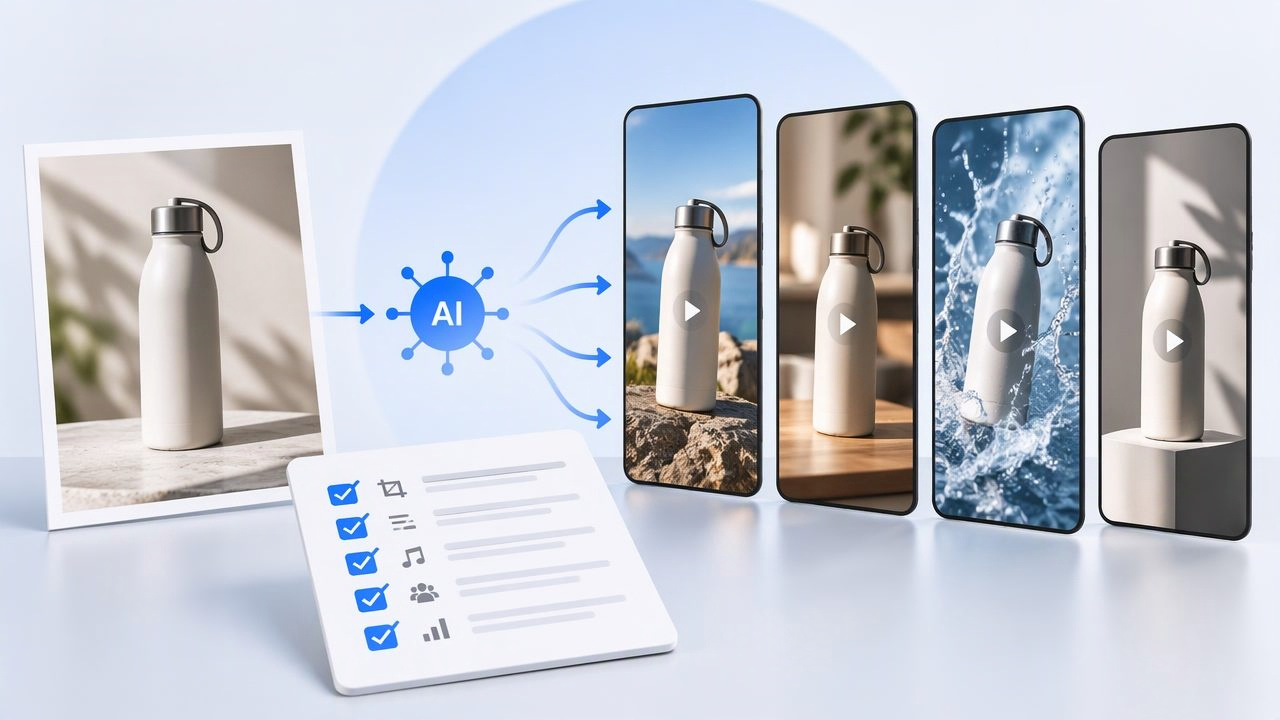
One strong product photo can be a useful starting point for short-form video, but a video that works on one platform may not suit another. The opening, framing, pacing, captions, and call to action all influence how a creative feels in a feed. A practical make videos for multiple platforms checklist with an AI video ad creator can help teams plan those differences without treating every export as a completely new concept.
The key is to separate what the image actually shows from what a video concept proposes. An AI-generated, creator-style scene is a creative direction to review—not proof that someone used the product, that a result occurred, or that an audience will respond a certain way. Use the checklist below to build distinct, reviewable concepts from one product image and adapt them responsibly for different placements.
Start with the product image, not the platform template
Before drafting a script or choosing a format, check whether the source image can support the story you want to tell. A clean, well-lit photo with the product visible gives an AI video ad creator a clearer visual reference than a crowded image with the item partly hidden. Check the label, color, shape, and packaging for legibility and accuracy. If a detail matters to the message, confirm it against an approved product image or specification.
Write down what the image does and does not establish. A photo of a travel bottle can show its silhouette, cap, and color. Unless those details are visible or supported by approved information, it cannot verify that the bottle keeps drinks cold for a certain number of hours, fits a particular bag, or never leaks. This simple distinction helps prevent polished creative from turning into an unsupported product claim.
Checklist: define the job of each platform video
“Multiple platforms” should not mean making identical videos and changing only the file name. Decide what each version needs to communicate and how someone is likely to encounter it. Platform formats and ad requirements can change, so check the current specifications in the destination account before publishing.
| Placement to plan for | Creative question | Adaptation to consider |
|---|---|---|
| Vertical short-form feed | Can the idea make sense while someone scrolls? | Put the product and central message early; leave space for interface overlays. |
| Stories or other full-screen placements | Does the message read quickly on a phone? | Use a clear focal point, concise on-screen text, and a direct next step. |
| Square or landscape feed placement | Does the composition still work in a wider crop? | Check product visibility and text placement after reframing. |
| Product or landing-page context | Does the video answer a real shopper question? | Prioritize accurate product details and a useful demonstration over a broad hook. |
This table is a planning aid, not a promise that one aspect ratio or pacing rule performs best everywhere. Verify the requirements for each intended placement and review the final crop on a device similar to the one viewers may use.
Five checks before generating concepts
- Choose an approved source image. Use a product photo your team has permission to use. Keep the original file, and note which product version, color, or package it depicts.
- List verified facts separately. Create a short reference of approved features, dimensions, materials, instructions, and claim language. Mark anything that needs substantiation or legal review.
- Pick one audience question per concept. For example: “What does the cap look like?” or “How could I carry this?” A focused question makes it easier to compare creative directions fairly.
- Define the intended placement. Note the aspect ratio, approximate duration, sound assumptions, caption needs, and any platform-specific rules to check. Avoid designing text right at the edges.
- Set boundaries for the scene. Specify what must remain accurate, such as packaging and product color. Identify what is only a proposed visual treatment, such as a kitchen counter or a creator-style voiceover.
These checks are especially useful when several people review the work. A shared brief makes it clearer whether feedback concerns the product, the message, or the visual style.
Concrete example: compare three concepts from one bottle photo
Imagine a fictional brand has one approved photo of a reusable bottle on a plain background. The following concepts are examples for planning, not descriptions of generated output or evidence of product performance. Each explores a different hook while keeping the visible bottle as the reference.
| Concept direction | What changes in the creative | What the photo supports | What still needs verification |
|---|---|---|---|
| “A closer look” | Open with a tight product view, then introduce a brief creator-style explanation. | Visible shape, color, and label details. | Any spoken claims about materials, capacity, or care. |
| “Pack for the day” | Frame the bottle as part of a proposed everyday packing scene. | The appearance of the bottle shown in the source. | Whether it fits a specific bag or suits a stated activity. |
| “Choose your routine” | Use a question-led hook and a simple product-focused close. | The product’s visible design and packaging. | Any suggestion about health, hydration, or improved results. |
For an initial comparison, keep the product image, audience, placement, and approximate length consistent. Change one major creative variable at a time—such as the hook or scene—so reviewers can identify what differs. Then make platform-specific edits to framing, captions, or call to action as a separate step. This does not establish which concept will perform better; it creates a clearer set of alternatives to assess.
Adapt the chosen direction without losing the message
After selecting a concept for further review, create a placement-specific version rather than stretching or cropping blindly. Check that the product remains prominent in each aspect ratio, that captions are readable against the background, and that key text is not covered by interface elements. If a crop removes context, revise the composition or simplify the message instead of shrinking text until it becomes difficult to read.
Review the opening, middle, and ending as separate jobs. The opening should orient viewers to the product or question; the middle should provide a relevant detail or visual explanation; and the ending should give a clear next step. Not every placement needs the same amount of explanation. A short feed ad may use a concise hook, while a product-page video may need more factual detail. Keep the underlying claims consistent across versions.
Also decide whether the video must work without sound. Add accurate captions for spoken content and check that essential information is conveyed visually or in accompanying text. Do not assume that every viewer will hear audio or that automated captions will correctly identify product names and technical terms.
Final review checklist before publishing
- Product fidelity: Does the item match the approved photo in color, shape, packaging, and visible details?
- Claim accuracy: Can the team substantiate every statement, demonstration, and implied result?
- Creative clarity: Is the hook understandable, and does each scene support the main idea?
- Placement fit: Have you checked the current format, crop, safe areas, duration, and destination rules?
- Captions and accessibility: Are captions accurate, readable, and synchronized? Is important information available without audio?
- Rights and disclosure: Are the image, music, likenesses, and other assets cleared for the intended use? Are required disclosures present?
- Version tracking: Are files labeled by concept and placement so reviewers can tell which differences were intentional?
Know what an AI video concept can—and cannot—tell you
AI-assisted video creation can help teams explore visual storytelling from existing product photography, but generated scenes may introduce details that were not in the source. Inspect hands, labels, accessories, background objects, and any implied interaction. Correct, regenerate, or remove anything inaccurate rather than assuming a realistic-looking scene is a faithful product demonstration.
Concept review is also different from campaign measurement. A set of alternative hooks can help a team discuss tone, clarity, and suitability for a placement. It cannot, by itself, prove audience preference, conversion lift, or sales impact. Those conclusions require an appropriately designed test and actual performance data. Keep illustrative concept examples separate from real customer experiences and verified product results.
If you are building a workflow around a single product image, UGCMade’s guide to testing ad variations offers related context for comparing creative directions. Use any tool or workflow as one part of a review process: start with an accurate source, define the platform’s job, compare focused concepts, and verify every final claim and crop before publication.
