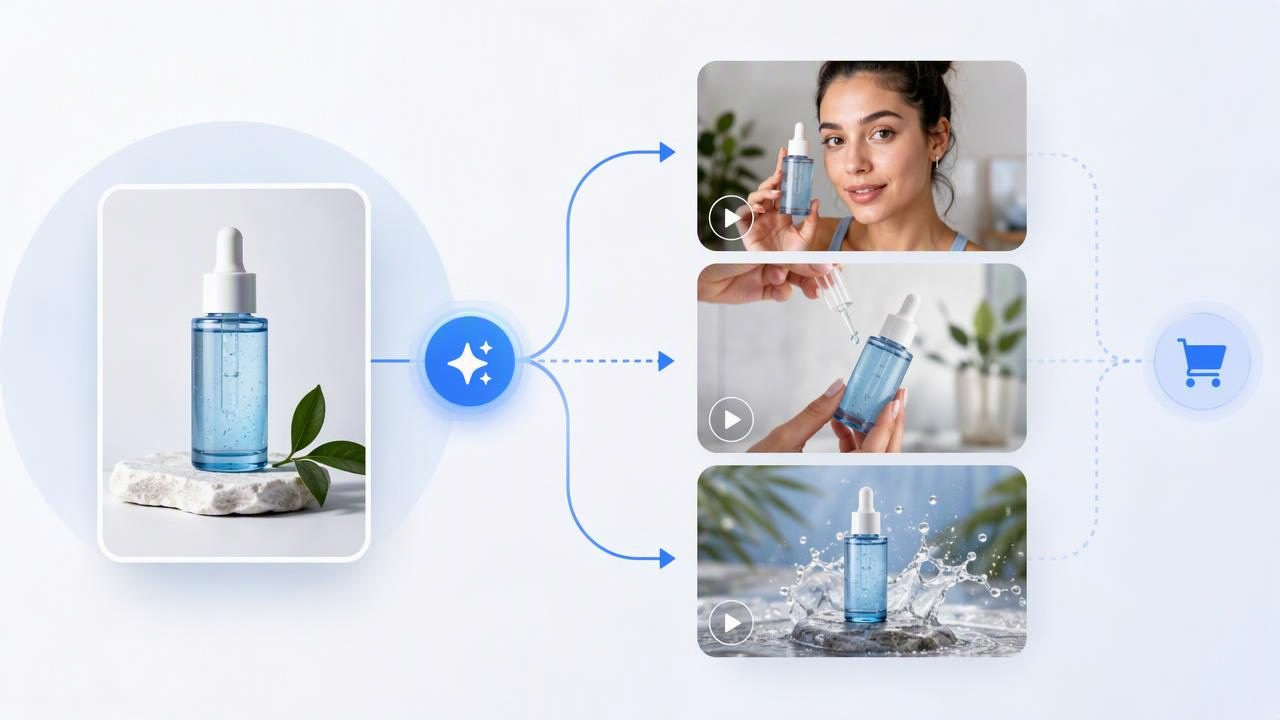
A photo to video platform for ecommerce brands can help creative teams explore more ad ideas from product imagery they already own. The practical value is not simply making a still photo move. It is using one accurate product image as a visual reference while comparing different UGC-style video concepts: different opening hooks, customer situations, objections, product demonstrations, and calls to action.
For lean ecommerce teams, this approach can make early creative planning more concrete. Instead of debating whether a “morning routine” concept or a “problem-solution” concept is stronger, marketers can review visual drafts built around the same product. That makes it easier to identify what each idea is actually communicating before committing to a larger production process.
However, an AI-generated concept video is not proof that a product will perform well in paid social, and it is not a substitute for accurate product claims, real customer feedback, or quality control. The most useful workflow is to treat these videos as creative directions to compare, then validate the strongest concepts through review, compliant messaging, and real-world testing.
Why One Product Photo Is a Strong Starting Point
A clean product photo gives every concept a shared visual foundation. If the product pack, color, label, shape, or key detail changes from one concept to another, it becomes difficult to judge whether viewers prefer the message or are merely reacting to inconsistent imagery.
Using the same source image lets a team hold the product constant while changing the storytelling around it. For example, a skincare brand can use one front-facing serum bottle image to explore several angles:
- Routine angle: “The one step I stopped skipping after cleansing.”
- Problem angle: “My skin looked dull by midday, so I changed this.”
- Ingredient-education angle: “What this serum is designed to support in a simple routine.”
- Gift angle: “A practical beauty gift for someone building a routine.”
- Product-detail angle: A close visual focus on packaging, texture, and usage sequence.
These are different messages for different audience motivations. The product itself remains the same, so the creative comparison is more disciplined.
Start With a Photo That Can Carry the Product Story
Not every product image is equally useful for video concept development. A catalog image on a plain background can be excellent for keeping product details accurate, but it may need supplemental visual direction when the concept relies on a lifestyle setting. A lifestyle image may provide immediate context, but it can hide product details that matter to a shopper.
Before using a photo, review it for visual accuracy and storytelling potential.
| Photo characteristic | Why it matters for concept comparison | What to check |
|---|---|---|
| Clear packaging | Helps reviewers identify the product quickly | Label, logo, size, and colors are readable |
| Single focal product | Reduces ambiguity in the creative direction | The intended item is not lost among props |
| Accurate visual details | Protects product consistency | Packaging version and color are current |
| Useful crop space | Allows room for captions and scene framing | Important details are not pressed against edges |
| Appropriate context | Supports the intended audience situation | Setting matches how the product is actually used |
If an image includes older packaging, an incomplete bundle, or a color that is no longer sold, correct that issue before concept work begins. A polished video concept built on inaccurate product representation can create avoidable confusion later.
A Concrete Example: Comparing Three Concepts for One Kitchen Product
Imagine an ecommerce brand selling a compact insulated lunch container. The team has one high-resolution product photo showing the container closed on a neutral countertop. Its goal is to find a stronger short-form video direction for busy office workers.
Rather than asking for three versions of the same vague “product ad,” the team develops three distinct UGC-style concepts from that image.
Concept 1: The weekday problem hook
Core idea: A creator-style speaker describes the frustration of buying lunch too often because packed meals become inconvenient or unappealing.
Hook: “I kept spending money on lunch because my packed meals never stayed enjoyable.”
Visual direction: Show the lunch container as the solution within a workday setting.
Product role: The product appears early and remains visually recognizable.
Message limit: Describe only features the brand can verify.
This concept is built around a relatable pain point. It may appeal to people who already feel the cost or inconvenience of buying lunch during the workweek. Its risk is overpromising: the script should not claim performance outcomes, temperature duration, or leak resistance unless those claims are supported by the product’s documented specifications.
Concept 2: The routine demonstration
Core idea: A simple “pack lunch with me” format shows where the container fits into a morning routine.
Hook: “My five-minute lunch prep starts with this.”
Visual direction: Move from ingredients to the container, then to a bag-ready moment.
Product role: Make the size, lid, and practical use case visible.
Message limit: Do not show capacity or accessories that are not included.
This version focuses less on frustration and more on habit. It can help shoppers picture ownership because the product is placed in a familiar sequence. The creative team should still distinguish between an illustrative scene and a literal product demonstration. If the original photo does not show the container open, an AI-generated depiction of food inside should be checked carefully against the product’s actual capacity and construction.
Concept 3: The giftable utility angle
Core idea: A speaker frames the container as a thoughtful, useful item for a friend starting a new job, commuting, or returning to school.
Hook: “A small gift that makes weekday lunches feel more organized.”
Visual direction: Present the product as a practical, everyday item.
Product role: Emphasize portability and appearance without unsupported claims.
Message limit: Avoid assuming every recipient has the same needs.
This approach changes the purchase context. It may be useful during a gifting period, but it should not be evaluated solely by whether it looks attractive. The team should ask whether the intended audience is actually shopping for gifts or whether a personal-use message better fits the campaign.
What You Are Comparing—and What You Are Not
When the same product image supports multiple video directions, compare the concepts using clear criteria. Otherwise, review meetings tend to drift toward subjective statements such as “this one feels better.”
| Compare this | Why it is useful | Do not assume this |
|---|---|---|
| Hook clarity | Shows whether the opening communicates a reason to keep watching | A strong hook guarantees sales |
| Audience relevance | Connects the scenario to a real shopper need | One audience motivation represents all buyers |
| Product visibility | Confirms viewers can identify what is being promoted | More product shots automatically make a better ad |
| Claim safety | Reduces risk of unsupported or misleading messaging | Creator-style language removes compliance obligations |
| Story-product fit | Tests whether the item naturally solves the stated problem | A realistic-looking scene is a verified demonstration |
The comparison should focus on creative hypotheses. For the lunch container, the hypothesis might be: “Office workers will respond more strongly to a time-saving routine than to a money-saving frustration.” That is a useful question. A concept video can help a team see whether the message is understandable; only measured campaign results can establish how an audience responds.
Separate Creative Examples From Actual Product Results
This distinction is especially important in UGC-style marketing. An AI-generated speaker, scene, or voiceover may resemble a customer story, but it is not automatically a real customer endorsement. Avoid presenting generated dialogue as a testimonial, review, or personal result unless it comes from a genuine, authorized source and is used accurately.
Likewise, a conceptual scene may show a product in a plausible setting without proving that the item performs a particular way. If a video shows a container in a commuter bag, that is a creative example of portability—not confirmation that it is leakproof. If a skincare concept shows a glowing complexion, that visual should not be treated as evidence of a specific skin result.
Creative direction is not product evidence. Use video concepts to explore messaging, then make sure every factual claim, depiction, and customer statement can be substantiated.
A Practical Review Method for Ecommerce Teams
For each proposed concept, ask the same five questions before moving forward:
- Can a viewer identify the product within the first few seconds?
- Does the opening speak to a specific shopper situation or concern?
- Is the product’s role in the story logical and easy to understand?
- Are all visible details, implied benefits, and spoken claims accurate?
- What single variable makes this concept meaningfully different from the others?
The final question prevents superficial variations. Changing only background music or caption color does not create a different concept. A real concept variation changes the persuasion strategy: pain point versus routine, education versus aspiration, gift versus personal use, or detailed demonstration versus concise social proof.
Limitations to Plan For
Photo-based AI video concepts are useful for ideation, but they have boundaries. Product photos may not contain enough information to represent every angle, texture, internal component, or real use condition correctly. Generated movement, hands, environments, and product interactions require review because visual details can be imperfect or inconsistent.
Teams should also account for brand standards. A concept may be attention-grabbing but still unsuitable if it conflicts with tone, uses an implausible setting, obscures required disclosures, or makes the product appear different from what shoppers receive. For regulated categories, legal and compliance review may be necessary before publishing.
Most importantly, creative comparison cannot replace audience testing. A concept that seems clear internally may not resonate with a real customer segment. Treat early videos as a way to narrow ideas, not as a final verdict on performance.
Use the Product Image as a Decision-Making Tool
The strongest use of a photo to video platform for ecommerce brands is not producing random variations. It is creating a structured comparison: one accurate product image, several genuinely different UGC-style narratives, defined claims, and a review process that separates visual appeal from verified outcomes.
That discipline helps brands build better video marketing ideas while protecting accuracy in product photography, content creation, and visual storytelling. For a more detailed walkthrough of turning a source image into a video concept, see UGCMade’s product photo-to-video guide.
