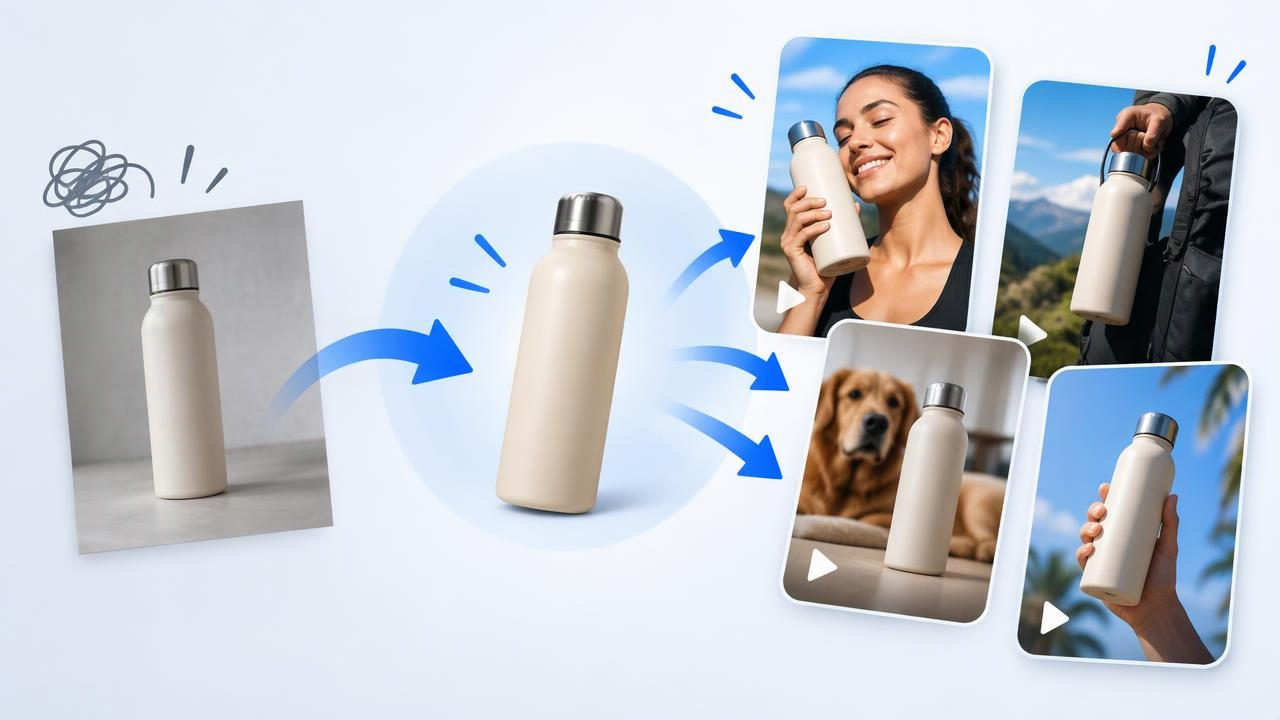
When an ad starts to feel stale, the instinct may be to commission a full reshoot. But before investing in new photography, consider what you can learn from the product images you already have. A social video ad tool can help turn one clear product photo into several AI-generated UGC-style video concepts to review and compare.
The aim is not to make a still image behave like authentic customer footage, or to assume a video will outperform a static ad. It is to explore different creative directions efficiently, then decide which ideas deserve further production or testing. This guide explains how to do that, using a concrete example and clear limits.
What it means to refresh tired ad creative
Creative fatigue is often used to describe a decline in attention or response as audiences see the same ad repeatedly. A creative refresh changes the way a product or message is presented while keeping the underlying offer and audience context in view. That change might involve a different opening, benefit, setting, format, or storytelling approach.
A new video is not automatically a new idea. If it repeats the same claim, framing, and visual sequence as the old ad, it may feel familiar even with motion added. Instead, treat a social video ad tool as a way to explore distinct concepts: for example, a problem-first introduction, a close-up product explanation, and a lifestyle-led scenario.
These are creative hypotheses, not evidence of performance. A concept that looks promising in a preview still needs appropriate review and, where suitable, a fair test with real audiences.
Start with a product photo that can support a story
Choose an image where the product is easy to identify and is not cropped in a way that hides an important detail. A clear, well-lit product shot gives an image-to-video process a more useful visual reference. Check that the packaging, color, logo, and proportions are represented accurately, especially if those details matter to the buying decision.
Before creating concepts, write down what the image can and cannot establish. A photo may show a product’s shape or packaging, but it cannot prove how it feels, performs, or behaves in real use. If you want to make a claim about an outcome, ingredient, compatibility, or feature, confirm it against approved product information. Do not let a generated scene imply facts the source image does not show.
- Use a clean source image: reduce distracting backgrounds and avoid tiny, unclear product details.
- Choose a relevant benefit: focus each concept on one substantiated reason someone might care.
- Set visual boundaries: note details that must remain accurate, such as label text and product color.
- Plan for the format: consider how the product and any captions will appear in a vertical frame.
Concrete example: one reusable water bottle, three concepts
Imagine an ecommerce brand has a product photo of a reusable water bottle on a neutral background. Its existing ad is a straightforward pack shot with a general product description. The team wants fresher creative, but has not yet decided whether to emphasize portability, design, or everyday use.
Using the same image as a reference, the team could prepare three concept directions for an AI-generated UGC-style video:
- Everyday carry: a short opening about packing for the day, followed by a visual focus on the bottle’s size and appearance.
- Design detail: a closer look at the product’s shape, finish, and visible features, paired with concise narration based only on verified specifications.
- Routine reminder: a casual scenario built around bringing a bottle along, without claiming a particular health or performance outcome.
These descriptions are creative examples, not finished product results. A generated video might suggest a setting, a presenter-style delivery, or motion around the image, but it may also introduce visual errors. It could distort the label, change proportions, or imply a use that the real product does not support. Review every output against the source image and product facts before treating it as usable creative.
Compare concepts, not just video styles
When several previews are available, assess whether they communicate meaningfully different ideas. Changing music or background alone may create surface variation without offering a useful new message. A more informative comparison changes one strategic element at a time, such as the opening hook or the benefit being emphasized.
| What to compare | Questions to ask |
|---|---|
| Opening | Does the first moment introduce a clear situation, question, or product detail? |
| Message | Is the concept focused on one substantiated benefit rather than several vague claims? |
| Product accuracy | Do the product’s shape, packaging, color, and visible features stay consistent? |
| Audience fit | Does the scenario feel relevant to the audience and the way they might encounter the product? |
| Clarity | Can a viewer understand what is being shown without relying on unsupported narration? |
| Practicality | Can the team review, edit, and publish the concept in line with its production and policy requirements? |
Keep a simple comparison sheet with the concept name, intended message, source image, and notes on accuracy. This makes it easier to explain why one direction is worth developing, even before any audience test takes place.
Use a repeatable workflow for creative exploration
A thoughtful workflow helps prevent fast content creation from turning into rushed approval. Start with a short brief that describes the audience, objective, approved product facts, and visual constraints. Then use the image and brief to explore distinct directions rather than requesting a collection of near-identical clips.
- Review the existing ad. Identify what feels repetitive: the opening, product shot, message, or overall format.
- Choose a learning question. For example, would a practical-use story be clearer than a feature-led introduction?
- Prepare the image and facts. Use a legible product photo and a list of claims that have already been checked.
- Describe separate concepts. Give each a different angle, while keeping the product and central objective consistent.
- Inspect the outputs. Check the product depiction, text, narration, scene logic, and any implied claim.
- Revise or reject. Correct what can be corrected; do not use an output that misrepresents the item.
- Decide on a next step. Keep a concept for human refinement, create a more accurate version, or test it appropriately.
This process is useful whether the final asset is AI-assisted, filmed with a creator, or produced in a studio. The tool supports exploration; it does not replace the brief, fact-checking, or creative judgment.
Separate generated concepts from actual product results
An AI-generated UGC-style video concept is not the same as a customer testimonial, a verified demonstration, or footage of a real person using the product. The style may resemble informal social content, but that does not make the scenario genuine customer experience. Avoid captions or narration that present an invented speaker as a real buyer or imply that an outcome has been observed.
Similarly, a preview is not proof that the concept will improve engagement, sales, or return on ad spend. Those outcomes depend on many factors, including the audience, placement, offer, landing page, timing, and the quality of the final creative. Treat ideas as hypotheses. If you run a test, define what you are changing and use a consistent measurement approach rather than attributing a result to the video format alone.
For product accuracy, compare every frame with reliable product references. Verify spelling, labels, dimensions, accessories, and any action shown. If the generated scene makes the product appear to open, pour, connect, or function in a particular way, confirm that it really can do so. When that cannot be verified, remove the implication or use a different concept.
Common mistakes when refreshing social video ads
- Starting with effects instead of a message: Motion may attract attention, but viewers still need to understand the product and the reason it matters.
- Changing too many things at once: If hook, offer, audience, and format all change, it is harder to learn which element influenced a test.
- Overloading the brief: A concept with several benefits and a long script can become difficult to follow in a short video.
- Assuming UGC-style means authentic: Do not imply a real customer story if the person or experience is generated.
- Skipping final review: A plausible-looking preview can still contain inaccurate product details or unsupported statements.
- Calling a creative preference a result: Internal approval identifies a team’s choice, not a proven audience response.
When a product-photo-based concept is not enough
A single image is a useful starting point for exploring visual directions, but it has limits. It may not provide reference material for multiple angles, accurate movement, scale, texture, or product use. If the story depends on demonstrating a feature that cannot be seen in the image, provide suitable verified references or plan a real demonstration. Do not rely on invented motion to fill factual gaps.
Some categories also require extra care with claims, safety, or how results are represented. Follow applicable advertising rules, internal review processes, and platform requirements. If an AI-generated element could confuse viewers about who is speaking, what is being shown, or whether a result is guaranteed, revise the creative or choose a more transparent format.
For more complex storytelling, a product photo can still serve as an early concepting aid, while final production may call for real product footage, a creator, or professional photography. The best route depends on what the viewer needs to see and what the brand can substantiate.
Turn a creative refresh into a useful next step
Refreshing tired ad creative does not require treating every new video as a guaranteed improvement. Start with a clear product image, define a specific learning question, and compare a small set of distinct concepts. Review each one for message clarity and factual accuracy, then decide whether it is ready for further editing or a carefully designed test.
The practical value of a social video ad tool is the opportunity to examine more than one storytelling direction before committing to a production path. For teams exploring this approach, UGCMade’s guide to testing ad variations offers a relevant next read. Keep the distinction clear: generated concepts can help shape creative decisions, but only properly reviewed work and real-world measurement can establish what is appropriate and how an ad performs.
