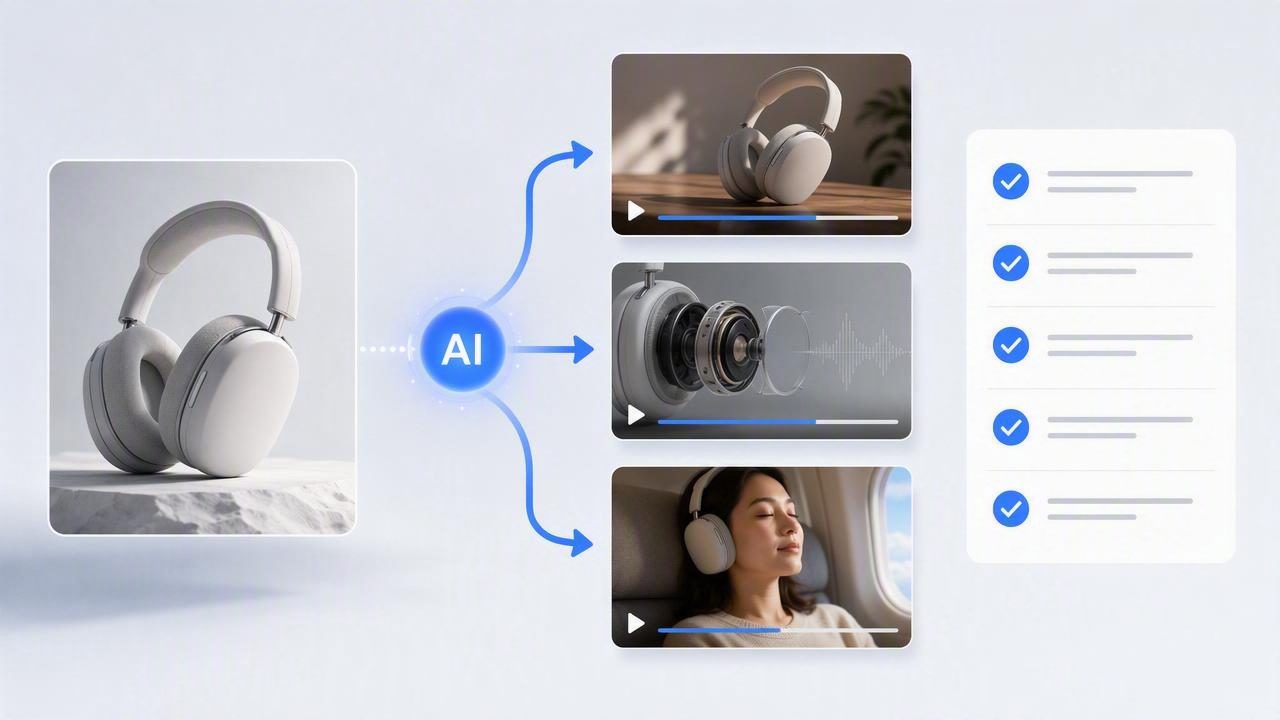
A single product photo can become the starting point for several distinct video ideas—but only if the image, concept, and expected message are clearly defined first. Rather than asking an AI product demo maker to create three nearly identical clips, use one image to explore different video marketing angles: a problem-led hook, a feature demonstration, and a lifestyle-focused story.
This approach is useful for ecommerce teams, product founders, and marketers who need more creative options without arranging a new shoot for every concept. The goal is not to assume that an AI-generated video will prove product performance. The goal is to create comparable creative concepts from the same visual asset, then review which direction best communicates the product’s value.
This checklist shows how to turn one image into three videos while keeping the product representation accurate, the storytelling intentional, and the comparison useful.
Why Create Three Videos From One Product Image?
One product photograph contains fixed visual information: the item’s shape, color, packaging, materials, and visible details. A video concept adds interpretation. It decides what the viewer notices first, what problem the product appears to solve, and what action the viewer should consider next.
Creating three concepts from the same image makes comparisons fairer. The product remains the constant, while the message changes. This can help a team evaluate whether its audience may respond more clearly to convenience, a specific feature, or an aspirational use case.
- Concept one: focuses on a relatable customer problem.
- Concept two: focuses on a visible product feature or use step.
- Concept three: focuses on the product in a lifestyle or gifting context.
These are creative hypotheses, not confirmed business outcomes. A polished video may still need legal review, brand approval, accessibility checks, and real-world testing before it is used in a campaign.
Start With an Image That Can Support Visual Storytelling
The source image influences what an AI-generated video can plausibly show. A clean, high-resolution product photo gives the model clearer reference details and gives your team a better basis for checking whether the output still resembles the product.
Before generating concepts, inspect the image for accuracy. If the photo contains an old label, discontinued color, misleading accessory, or unclear scale, fix that issue before using it. Video motion can make small visual errors harder to spot.
Product Photo Readiness Checklist
- Is the product fully visible, with important details unobstructed?
- Does the packaging, logo, color, and finish match the current product?
- Is the image sharp enough to show edges, text, and key materials?
- Is the background simple enough that the product remains the visual priority?
- Do you have permission to use every visible prop, person, logo, and location?
- Are claims shown on the packaging current and approved for marketing use?
If a product needs to be shown operating in a precise way—such as a skincare dispenser, kitchen tool, or electronic device—provide approved reference details separately. An image can guide appearance, but it may not reliably establish every movement, ingredient, measurement, or technical result.
A Concrete Example: One Reusable Water Bottle, Three Video Directions
Imagine a brand has one studio image of a matte stainless-steel water bottle on a plain light background. The bottle has a visible carry loop and a screw-top lid. The brand wants short creator-style product videos for social media, but it does not want every clip to repeat the same sales message.
Using that one photo, the team can prepare the following three concepts.
| Video concept | Primary message | Suggested opening | What to verify |
|---|---|---|---|
| Daily inconvenience hook | Carrying a bottle can be easier with a loop. | “I kept dropping my water bottle on the way to work.” | The loop’s shape, position, and realistic use. |
| Feature-led mini demo | Show the screw-top lid and carry loop. | Close-up of the product with text: “The detail I use every day.” | How the lid opens and closes; avoid unsupported leakproof claims. |
| Lifestyle routine | The bottle fits into an active daily routine. | “My desk-to-gym essential.” | Scale, color accuracy, and whether shown use matches the product. |
The first concept leads with frustration. It gives the video a human reason to exist before introducing the object. The second keeps the product itself at the center, making it appropriate when a physical detail is the strongest selling point. The third emphasizes context and identity: a viewer may imagine bringing the bottle to work, class, or a workout.
Notice what these concepts do not claim. They do not state that the bottle keeps drinks cold for a certain number of hours, never leaks, improves hydration, or is indestructible unless the brand has substantiated and approved those statements. A creator-style script should sound natural, but it still needs to remain truthful.
The Turn One Image Into Three Videos Checklist
- Choose one product truth for each concept. Write a single sentence that can be supported by the visible item or approved product information. For the bottle, “It has a built-in carry loop” is more defensible than “It is the most convenient bottle ever.”
- Give each video a different viewer motivation. Use a pain point, curiosity about a feature, or an everyday routine. If all three use the same hook and benefit, they are variations of one idea rather than three distinct concepts.
- Define the first three seconds. Decide whether the video begins with the product, a person’s reaction, a question, or on-screen text. The opening should match the concept rather than rely on generic attention-grabbing language.
- List required visual moments. For a feature demo, this may include a close-up of the lid and carry loop. For a lifestyle video, it may include the product on a desk or inside a gym bag. Keep the list short enough to review.
- Write a constraint note. State what must not change: bottle color, logo placement, lid type, and proportions. Also state what must not be implied, such as medical, environmental, or performance claims.
- Use one consistent comparison variable. Keep length, aspect ratio, product photo, and call to action similar where possible. This makes it easier to judge the impact of the core concept rather than unrelated production differences.
- Review generated footage frame by frame. Check labels, hands, product geometry, text overlays, and use actions. Remove or revise any scene that misrepresents the item.
How to Compare the Three Concepts Before Publishing
Comparing AI-generated UGC-style videos is not only about which one looks most cinematic. The useful question is whether each concept communicates its intended product message clearly and accurately. A simple review scorecard can align marketing, creative, and compliance stakeholders.
| Review question | Score: 1–5 | Notes to capture |
|---|---|---|
| Is the product recognizable immediately? | 1–5 | Check color, label, silhouette, and scale. |
| Does the opening match the target audience’s likely concern? | 1–5 | Identify whether the hook is specific or generic. |
| Is the main benefit understandable without sound? | 1–5 | Review captions and visual context. |
| Are all product actions and claims accurate? | 1–5 | Flag anything requiring revision or substantiation. |
| Does the ending offer a clear next step? | 1–5 | Keep the call to action proportionate to the message. |
Use this scorecard before discussing performance metrics. Early review is about creative quality and brand safety. Once approved videos are placed in an actual campaign, results may depend on audience, placement, budget, offer, landing page, seasonality, and many other factors. A concept that appears strongest in internal review is not guaranteed to produce the strongest outcome.
Prompt Notes That Improve Concept Separation
When preparing AI video concepts, vague prompts often produce vague differences. The following structure keeps the creative direction specific without implying capabilities or results the product does not have:
Product reference: matte stainless-steel water bottle with carry loop.
Concept: daily commute inconvenience.
Opening: person reaching for a bottle while leaving home.
Required product detail: carry loop visible in close-up.
Tone: casual, practical, creator-style.
Avoid: performance claims, altered branding, incorrect lid design.
On-screen text: “A small detail that makes carrying easier.”
For the feature-led version, change the viewer motivation and required shot, not just a few adjectives. For the lifestyle version, change the setting and emotional context while preserving the approved product details. This produces a more meaningful comparison than generating three clips labeled “fun,” “modern,” and “premium.”
Limitations to Plan For
AI-generated video can help visualize concepts from a product photo, but it should not replace product knowledge or verification. Motion may be stylized, hands may interact with items imperfectly, tiny label text may shift, and a generated environment may not reflect your actual product use conditions.
- Do not treat generated scenes as proof of product durability, fit, efficacy, safety, or performance.
- Do not use synthetic endorsements as if they were real customer testimonials.
- Do not depict a product feature that is absent from the supplied image or approved specifications.
- Do not assume all generated scenes are suitable for every advertising policy or regulated category.
- Do use approved claims, clear disclosures where required, and human review before publication.
For products where exact operation matters, combine AI-generated concept footage with verified product photography, approved demonstrations, or original video. The strongest content creation process uses generated visuals as a creative aid while protecting factual accuracy.
Make the Image Work Harder, Not Less Honestly
Turning one image into three videos is a practical way to broaden visual storytelling without losing focus. Start with one accurate product photo, assign a distinct purpose to each concept, and compare outputs against the same accuracy and clarity criteria. The result is not three promises of performance; it is three better-defined creative options for brand engagement.
For a more detailed explanation of preparing a source asset and evaluating photo-based video ideas, UGCMade’s guide to turning a product photo into video offers additional context for planning responsibly.
