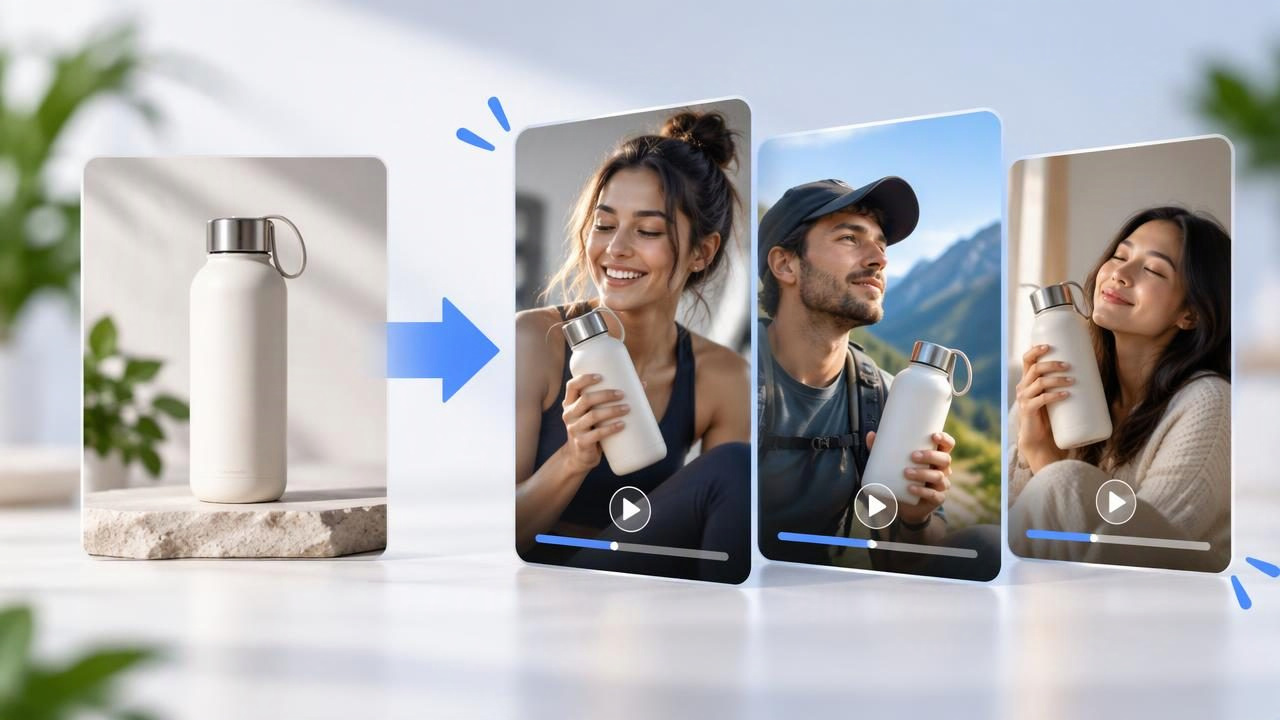
A product photo can be more than a listing image: it can be a visual reference for exploring several UGC-style video ideas. A UGC creative generator for consistent product videos can help teams compare different hooks, settings, and storytelling angles while keeping the same product at the center of each concept.
Consistency does not mean making every video identical. It means preserving the product’s recognizable appearance and keeping its factual details, approved claims, and brand context aligned as the creative changes. The distinction matters: an AI-generated concept can suggest how an ad might feel, but it does not prove how the real product performs or how an audience will respond.
This guide explains how to use a product image as a reference, compare creative directions fairly, and identify the limits of generated video before using it in marketing.
What “consistent” means in UGC-style product video
In this context, UGC-style refers to a video direction that borrows familiar creator-content conventions: conversational framing, an everyday setting, a personal point of view, or a product shown in use. It does not mean that a generated video is genuine customer footage or an authentic testimonial. Be transparent about how content is made and do not present invented experiences as real endorsements.
When teams compare multiple concepts, product consistency has several parts:
- Visual identity: The product’s shape, color, packaging, logo placement, and distinctive features should remain recognizable.
- Factual accuracy: Each script or on-screen message should use only verified product information and approved claims.
- Brand continuity: Tone, audience, and visual cues should fit the same brand, even when the setting or opening hook changes.
- Fair comparison: Change a small number of creative variables at a time so reviewers can tell what differs.
A concept may meet some of these criteria and miss others. For example, a video can use the correct bottle color but invent a feature or make the product look a different size. Consistency therefore needs human review, not just a matching image prompt.
Start with a reference image that answers the right questions
The source photo influences what a video concept can show. Choose an image in which the product is clearly visible, well lit, and not obscured by hands, reflections, props, or packaging. A clean front or three-quarter view can make it easier to check details across concepts. If a feature is important to the story, include a separate reference image of that feature where the tool permits multiple references.
Before creating concepts, write down what must not change. This short product brief can include the correct color and proportions, the name of any included parts, the intended audience, and the claims that are approved for use. Also note what is unknown. If the image does not show a lid mechanism, for instance, a generated scene should not be treated as evidence of how that mechanism works.
Keep the creative request focused. Describe the intended viewer, the message, and the desired tone, then specify the facts that must be preserved. Avoid packing a prompt with contradictory directions such as “minimal and cinematic” alongside a long list of unrelated scenes. Clear constraints make concepts easier to evaluate, though they do not guarantee that every generated detail will be accurate.
Example: compare three concepts for one insulated bottle
Imagine an ecommerce team has a clear photo of a reusable insulated bottle. The verified information says it is available in a particular color and has a screw-top lid. No temperature-retention duration or leakproof claim has been confirmed. The team wants to explore three short-form creative directions, using the same product image as the visual reference.
| Concept direction | Creative idea | What to check |
|---|---|---|
| Morning routine | A quick, conversational opening shows the bottle beside a bag before someone heads out. | Does the bottle keep its recognizable color, shape, and lid? Does the setting imply anything unsupported? |
| Desk reset | A creator-style shot introduces the bottle as one item on a tidy work desk. | Is the product still the visual focus? Are any labels or accessories invented? |
| Design close-up | A simple close shot draws attention to visible design details, with a concise product introduction. | Are details actually visible in the reference? Does narration avoid unverified functional claims? |
These are creative examples, not claims that the bottle was tested, that the scenes were produced, or that the concepts generated sales. Their purpose is to illustrate how a team could vary context and framing while keeping one product reference and one factual brief in common.
For a fair review, hold the product and approved message constant, then compare the creative angle. If the goal is to learn whether an everyday routine or a design-focused opening is more suitable, do not also change the bottle color, audience, offer, and central claim between versions. Otherwise, it becomes difficult to identify which difference shaped the creative judgment.
Separate a promising concept from a product result
A generated video can help answer questions about presentation: Is the opening easy to understand? Does the product appear quickly? Does the chosen setting match the intended audience? Are captions readable on a small screen? These are useful creative-review questions, but they are not evidence of product performance.
Actual product results require real-world validation. A concept preview does not establish that a bottle keeps drinks cold for a particular duration, fits a specific cup holder, resists leaks, or is easy to clean. Those points need appropriate product documentation or testing. Similarly, a visually convincing creator-style scene does not show that a real customer used or endorsed the item.
Keep the distinction clear in review documents. Label outputs as “concept,” “draft,” or “creative direction” until the visuals and claims have been checked. If the video will be published, verify product details against reliable source material, review any applicable advertising and disclosure requirements, and replace invented narration with approved copy. Do not use a generated first-person story as a customer testimonial unless it reflects a real, authorized experience.
A practical scorecard for comparing video concepts
Review each version against the same criteria. A simple pass, revise, or reject system can be more useful than a vague “looks good” response. Add notes that point to a specific frame, phrase, or claim so the next edit is actionable.
- Product fidelity: Do shape, color, logo, and visible components match the reference?
- Claim safety: Is every stated benefit supported by approved product information?
- Opening clarity: Can a viewer quickly tell what the video is about?
- Visual focus: Is the product easy to see, or do props and scene details compete with it?
- Brand fit: Does the voice and setting feel appropriate for the intended audience?
- Usability: Are text, framing, pacing, and any key details clear in the intended placement?
Record the image used, the creative brief, the version label, and the reviewer’s notes. This makes comparisons repeatable when a team revisits the concepts or creates a new set. It also helps separate a creative preference from a factual correction: “The opening feels too formal” is a different kind of feedback from “The lid shown is not the product lid.”
Limitations to account for before publishing
Image-to-video systems can interpret a reference rather than reproduce it exactly. Product edges, small text, logos, hands, reflections, and moving parts may change between frames. A scene can look polished while containing a subtle mismatch. Inspect the full video, including close-ups and transitions, rather than checking only a thumbnail or opening frame.
A single photo also provides limited information. It may not show the back of the package, the scale of the product, how it opens, or how it behaves in use. Avoid asking a concept to demonstrate hidden features that cannot be verified from the available references. Add accurate source material when possible, or choose a story that does not depend on unknown details.
Generated speech and captions need their own review. Check names, pronunciation, spelling, timing, and whether words imply a promise the brand cannot substantiate. A realistic visual style can make invented claims seem especially credible, so factual review should happen before publication rather than after audience feedback.
Finally, creative comparison is not the same as a controlled marketing test. If you later test published versions, define the audience, placement, measurement period, and success metric in advance. Treat outcomes as specific to that test; do not assume a concept that looks stronger in review will necessarily perform better.
Make the image a starting point, not the source of truth
A product photo gives a generator a visual anchor, while a concise brief and review process help keep alternative video concepts comparable. The strongest use is exploratory: test distinct hooks and settings, catch promising directions, and identify details that need correction before production. The image cannot verify claims, prove real-world results, or replace product knowledge.
For a closer look at the image-to-video approach, see UGCMade’s guide to turning a product photo into video. Use any generated output as a draft for human review, and keep creative possibilities clearly separate from verified product facts.
